
The short answer: A social media audit checklist for businesses should examine more than posting frequency. Review who controls each account, whether the profile describes the current business, which audience and customer questions the content serves, how comments and inquiries are handled, whether links work, and how results connect to business goals. Collect evidence before making changes: screenshots, account access records, post examples, link tests, platform reports, and sales or support feedback. Then prioritize fixes by customer impact, risk, effort, and ownership. A useful audit ends with a small set of dated actions, not a large score that cannot explain what to do next.
What a social media audit checklist for businesses should uncover
Some businesses publish steadily yet cannot say who the content is for or what a customer should do after seeing it. Others have fewer posts but answer product questions reliably, link to accurate pages, and provide useful proof. An audit should reveal whether social activity serves the business and its audience—not reward the largest post count or loudest engagement number.
The review below is designed as a 30-day field sheet. “30 days” is a suggested working window for gathering evidence and assigning improvements; it is not a ranking factor or an industry rule. Small teams may complete it faster. Multi-brand organizations may need more time to confirm access, policy, and regional ownership.
Do not change account passwords, remove administrators, delete content, or publish corrections while evidence is still being gathered. Record the current state first. Sensitive issues, customer data, legal claims, suspected account compromise, or employee-related concerns should go to the responsible internal owner.
Before the audit: set the boundary
Decide which accounts and markets are included. List official brand pages, regional profiles, founder or employee accounts that represent the business, legacy accounts, and paid social accounts if relevant. Separate company-controlled pages from personal profiles. Record who requested the review, the purpose, the time period, and who can approve changes.
Use read-only access where possible. Do not ask for or store passwords in a spreadsheet. Use platform-native roles and company-approved access procedures. If a person who left the organization still controls an account, document the issue and route it to the account owner rather than improvising a recovery process. Preserve evidence of suspicious activity without exposing private messages or customer data to an unnecessary audience.
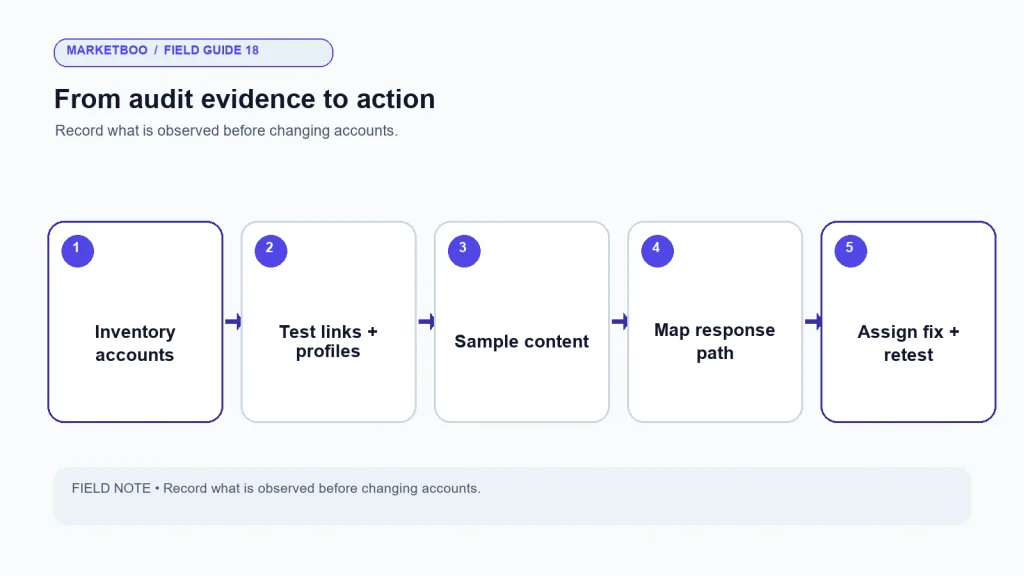
Create one row per account. Useful fields include platform, account name, canonical URL, region or language, owner, backup owner, access status, last reviewed date, brand consistency, link test result, and planned action. Mark unknowns as unknown; do not guess who owns a profile based on its display name.
Phase 1: account ownership and profile accuracy
Check whether each account has an accountable business owner and a backup. Confirm that administrators are current employees or approved partners, and that former staff or agencies no longer retain access unless an active contract requires it. Review the company’s access process with the person responsible for security. A marketing audit is not a penetration test, but it should identify basic governance gaps.
Review names, profile images, banners, bios, descriptions, contact paths, location, language, and pinned content. Compare them with the current website and product/service offering. A profile can become inaccurate after a rebrand, product change, merger, or shift in customer support hours. If a page states a response promise, confirm the team can meet it.
Click every profile link on desktop and mobile. Check whether the destination works, reflects the current offer, and provides a clear next step. Test campaign links with tracking parameters only if the organization has a documented naming convention. Record redirect loops, expired pages, broken forms, outdated event links, or destinations that no longer match the post.
| Account check | Evidence to collect | Finding to record | Route to |
|---|---|---|---|
| Owner and backup | Platform role list or owner confirmation | Confirmed, missing, or unknown | Account administrator |
| Profile details | Current profile and website comparison | Accurate, stale, or inconsistent | Brand owner |
| Contact path | Clicked phone, email, form, or message path | Working, broken, or unclear | Web or customer support owner |
| Access and permissions | Current role review, not password copies | Required access change | Security/account owner |
| Pinned or featured content | Current post and associated destination | Current, expired, or unsupported | Social editor/product owner |
| Region and language | Target market and language confirmation | Correct, mixed, or unknown | Regional marketing owner |
Phase 2: audience and content purpose
For each account, state its intended audience and role. Is it for customers, prospects, partners, distributors, employees, or a local community? Does it provide product education, support, brand updates, recruiting information, or thought leadership? More than one role may be appropriate, but the account should have a clear center. A page that tries to serve everyone may publish without a recognizable promise.
Sample content across a representative period. Include recent posts and content tied to a campaign, product launch, or seasonal event. Do not select only the top-performing posts; that would bias the review. Record the intended audience, customer question, format, claim or proof, call to action, link destination, and available result. Include a few posts with low response because they may reveal gaps in clarity or distribution.
Look for content that explains how the business helps, who it serves, what evidence supports its claims, and what a prospect can do next. Notice repeated topics, missing questions, vague product language, and content that relies on internal announcements without a customer context. A business can share company news, but it should help the audience understand why that news matters.
Avoid treating an engagement count as a quality label. A post can attract reactions from an irrelevant audience. A technical post may generate fewer public comments but support a sales conversation. Ask sales, support, recruiting, and product teams which questions they hear repeatedly and whether social content already answers them. Record the source of each insight; an anecdote is useful but should not be presented as a universal audience finding.
Phase 3: content quality and publishing workflow
Review clarity, accuracy, consistency, accessibility, and appropriateness for the channel. Check whether the copy uses plain language, explains uncommon terms, and avoids unsupported superlatives. Confirm that images have meaningful alt text where the platform supports it, videos have captions or an accessible transcript when appropriate, and graphics do not rely on color alone to convey meaning.
Ask who drafts, reviews, approves, schedules, publishes, moderates, and archives content. The process should specify what requires technical, product, legal, HR, or customer-support review. Check whether there is a route for urgent corrections. A content calendar is valuable only if owners can keep it current and the business has a way to pause scheduled material during a crisis or product change.
Compare planned cadence with actual publishing. A gap may reflect capacity rather than poor strategy. Note late approvals, missing assets, duplicate work, unclear briefs, or dependency on a single person. The audit should recommend a workflow the team can maintain. Do not prescribe a posting frequency without considering production capacity and audience usefulness.
| Content sample | Audience and question | Proof or claim | Destination | Quality question | Next action |
|---|---|---|---|---|---|
| Product education | Who needs this information? | Can the claim be verified? | Does the page continue the explanation? | Is the next step clear? | Keep, clarify, or update |
| Customer story | Who is the story for? | Is the source authorized and contextualized? | Can a reader see scope and limitations? | Does it avoid overgeneralizing one result? | Confirm rights or revise |
| Company update | Why does the audience care? | Is the date and fact current? | Is a related page available? | Does the copy make relevance explicit? | Add context or archive |
| Campaign post | What action is requested? | Are price, timing, and terms accurate? | Does the link work on mobile? | Does the destination match the promise? | Correct or pause |
| Short video | Can the message be understood without sound? | Are statements supported? | Is the next step accessible? | Are captions and framing readable? | Add captions or edit |
Phase 4: community and enquiry handling
The audit should test what happens when someone asks a question. Use existing business-approved examples or a simulated scenario rather than contacting customers under false pretenses. Map common message types: product question, service issue, order problem, partnership inquiry, spam, complaint, sensitive request, and potential sales lead. Record who can answer each one, what requires escalation, and what response time the business can realistically support.
Review a sample of public comments and messages only with appropriate access and privacy controls. Do not copy personal or sensitive information into the audit. Aggregate the issue type and route it to the relevant team. Check whether unanswered questions repeat, whether the business moves private cases into an appropriate channel, and whether staff avoid requesting sensitive details in public.
For inquiries that may become leads, check whether the social team records the source, account, date, question, owner, and disposition in the approved system. Avoid collecting more personal data than the business needs. Confirm how opt-ins and messaging preferences are handled under the company’s policies and applicable rules; an audit checklist cannot replace qualified legal or privacy review.
Phase 5: measurement and reporting
Identify the business objective for each account and the measures used to review it. A profile intended for customer support may need response and resolution evidence. A recruiting account may look at relevant candidate actions. A B2B account may support technical education and qualified conversations. An ecommerce account may support product discovery or campaign traffic. Use definitions that fit the role instead of forcing every channel into one sales metric.
Record the reporting period, time zone, platform source, paid versus organic scope, and any tracking setup. Check whether link naming is consistent and whether analytics can distinguish social traffic from other referrals. Understand that platform analytics may use their own definitions and attribution, while site analytics or CRM records use different rules. Keep those views separate and label them clearly.
Use a simple evidence table: objective, measure, source, owner, review cadence, limitations, and decision. If a number cannot be reconciled or defined, mark it as a measurement gap. A spreadsheet full of metrics is not evidence of a functioning measurement system if no one knows what decisions the values support.
Prioritize findings without inventing a score
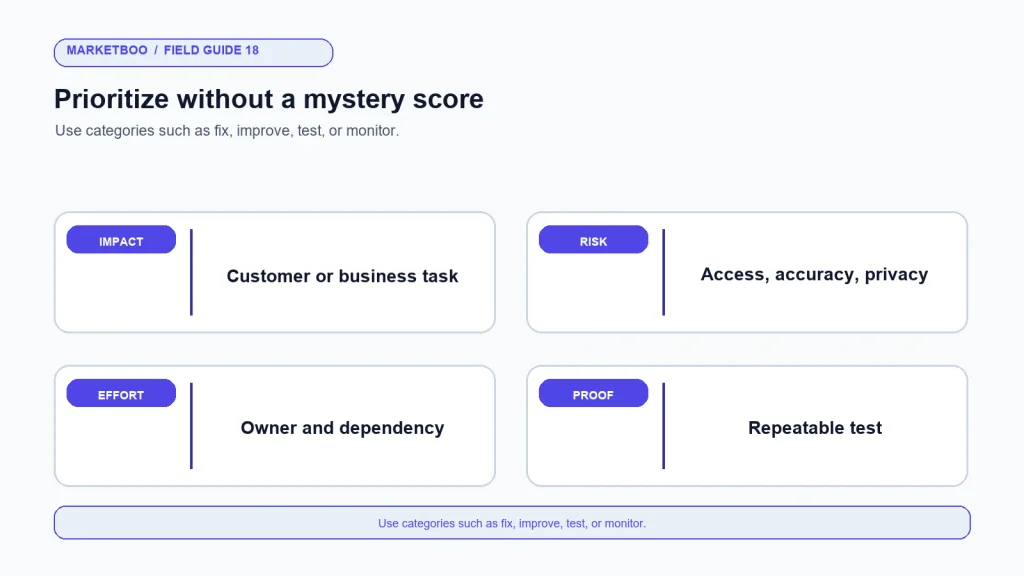
Use four practical questions for each finding: Does it affect customer access or accuracy? Does it create a security, privacy, or claim risk? Is it blocking an important business outcome? How much effort and dependency does a fix require? Group actions as immediate correction, planned improvement, test, or monitor. The categories help a small team choose what to do; they are not a numeric performance score.
For example, a broken contact link may be an immediate correction because it prevents an interested customer from reaching the business. A stale but low-traffic campaign post may be scheduled for replacement. A new video series might be a test, not a requirement. A content idea that lacks evidence can be monitored until the business can substantiate its claims.
| Finding | Customer or business impact | Evidence | Owner | Action type | Due/review date |
|---|---|---|---|---|---|
| Profile link redirects to expired page | Prospects cannot reach current offer | Mobile and desktop link test | Web owner | Immediate correction | |
| No backup account administrator | Access continuity is unclear | Role list review | Account owner | Planned control | |
| Repeated product question has no answer post | Support and sales repeat explanation | Aggregated inquiry themes | Product/social owner | Content test | |
| Platform and CRM lead totals differ | Reporting cannot be reconciled | Same-period comparison | Marketing operations | Diagnose |
Write each finding so another person can repeat the check. “Social needs improvement” is not actionable. “The profile link returns a campaign page that ended on [date]; replace it with the current product page and retest on mobile” is specific. Keep the audit concise enough that the owner can complete it.
Validate the diagnosis with the people who use the process
Before recommending a larger content calendar or new platform, talk briefly with the employees who answer customers and create the source information. Ask sales which questions prospects repeat, support which answers are sent frequently, product which claims change, and the social editor which approvals routinely stall. Keep the interviews bounded and record themes rather than copying private messages or attributing a customer statement without permission.
Look for differences between the written process and actual behavior. A social policy may say messages are answered within one business day, while the account has no assigned monitor. A calendar may include technical claims, but product review happens only after an issue is reported. The gap may require a change in ownership rather than more content. An audit is most useful when it shows how the work actually happens.
Do not let one stakeholder’s preference become a universal diagnosis. A sales lead may want more product posts, while customer support needs clearer help links. Both can be correct for different audience tasks. Capture the role and evidence behind each finding, then let the accountable owner decide which issue to address first.
A finding should include a verification test
Every recommendation should name how the business will know that the change worked. If a profile link is replaced, retest it on mobile and check the destination. If a response owner is assigned, sample the inbox after the agreed period and confirm that messages were routed. If a new content topic is tested, define the audience, period, and signal before publishing. This keeps the audit from ending at the action list.
Preserve an audit trail
For each material finding, retain the URL or account identifier, capture date, evidence type, reviewer, and disposition. Store screenshots only when needed and avoid including names, messages, or customer identifiers that the team does not need. If the audit contains a privacy or security issue, keep the evidence in the organization’s approved restricted system rather than a broadly shared marketing folder.
An audit trail helps a future reviewer tell whether a link was already broken, whether an account changed after the review, and why the company chose a particular fix. It also protects employees from being blamed for a system issue that had no assigned owner. Use a simple status vocabulary—confirmed, needs investigation, fixed and retested, accepted for now, or closed as not applicable—and define what each status means.
If two reviewers disagree, record the evidence and the decision owner. The purpose is not to prove that one auditor was right; it is to make the resulting action reviewable. A finding may be deferred because a platform feature does not support the requested change, or because a higher-priority customer path is being repaired first. Write the reason and revisit date.
| Recommendation | Verification test | Evidence to retain |
|---|---|---|
| Update profile contact link | Open from a mobile profile and complete a safe form test | Date, destination, test record |
| Assign a comment owner | Review a defined sample of new comments after the change | Coverage note and escalation cases |
| Add product education post | Compare intended audience response and relevant questions | Post URL, period, qualitative themes |
| Standardize campaign tags | Click approved test links and inspect analytics source | Tag convention and event result |
Keep measurement proportional. A small business may not have enough volume to infer a reliable conversion change from a single content experiment. It can still verify that the link works, the content is accurate, and the intended team receives the inquiry.
A 30-day audit calendar
Days 1–5: inventory and access. List accounts, markets, owners, backup contacts, and review permissions. Save a dated baseline. Route compromised or unowned accounts to the appropriate administrator.
Days 6–10: profile and destination checks. Compare profile details with current business information. Test links, contact paths, forms, and pinned content. Fix urgent broken customer journeys.
Days 11–17: content and audience review. Sample representative posts, ask internal teams for recurring questions, and map content to audience purpose. Record gaps without assuming every low-engagement post failed.
Days 18–22: community and workflow. Review response categories, escalation, approval owners, and realistic service expectations. Identify data-handling questions for qualified review.
Days 23–26: measurement. Compare platform, web analytics, and CRM definitions for the same period. Document tracking gaps and report limitations.
Days 27–30: action plan. Assign owners and dates, make high-impact corrections, and select a small number of content or process tests. Set a review date to see whether the fixes worked.
The dates are a suggested sequence, not a mandatory schedule. If the business has multiple regions or account access issues, expand the review. If a finding affects customers now, do not wait for the calendar to reach the final week.
How to conduct a business social media audit
- Set scope and purpose. List included accounts, markets, platforms, date range, reviewer, and approval owner.
- Inventory official accounts. Confirm names, canonical URLs, region, language, business purpose, and accountable owner.
- Review access safely. Verify administrators and backups through platform roles; never collect passwords in the audit file.
- Check profile accuracy. Compare bio, contact details, product claims, location, and featured content with current business sources.
- Test every path. Open profile links and selected post links on desktop and mobile; record forms, redirects, and errors.
- Sample content fairly. Review representative posts across time and performance levels; record audience, question, proof, CTA, and destination.
- Inspect accessibility and workflow. Check captions, readable creative, alt text where available, approvals, and correction routes.
- Map community handling. Classify common inquiry types, owners, realistic response expectations, and escalation boundaries.
- Reconcile measurement definitions. Compare reporting sources for the same period and mark gaps or incompatible definitions.
- Prioritize and assign fixes. Name each action, owner, evidence, due date, and success check; revisit after changes.
When to bring in outside support
An outside review can help when there are many accounts, unclear ownership, inconsistent content, or no repeatable link between social activity and business outcomes. Before hiring, define whether you need a content audit, account access cleanup, social strategy, community workflow, reporting setup, or ongoing management. A general “audit” can mean very different work.
Marketboo’s full social media management service may be relevant when the business needs continuing support after the audit. For a broader search and paid acquisition picture, review SEO and GEO services or global paid media. Ask any provider to define scope, evidence, account access, deliverables, exclusions, and who is responsible for business decisions.
FAQ
What should a social media audit include?
Review account ownership, access, profile accuracy, audience purpose, content, accessibility, publishing workflow, community response, link paths, measurement, and action owners. The exact scope should match the business’s platforms and goals. Save evidence for each finding and distinguish confirmed issues from assumptions.
How often should a business audit social media?
Review important account and link details whenever the business changes branding, product information, owners, or customer support paths. A broader audit can be scheduled periodically based on team size and risk. The 30-day plan here is a practical project window, not a universal required frequency.
Can I use follower count to judge whether a social account is healthy?
Follower count is one context metric, not a full measure of account health. It does not show whether followers are relevant, whether customers can find accurate information, or whether inquiries are handled. Combine it with account purpose, content usefulness, audience fit, and appropriate business outcomes.
Should low-engagement posts be deleted?
Not automatically. A post may serve a niche audience, explain a product, or preserve useful information despite limited visible interaction. Check accuracy, rights, relevance, and customer impact first. Remove or update content when it is outdated, misleading, or no longer appropriate, following the business’s retention and approval process.
How do I audit social media account access?
Use each platform’s role or permission controls and review current users with the account owner. Confirm a primary and backup administrator, remove access through the approved process when no longer needed, and avoid collecting passwords. If ownership is unclear or access is compromised, route the issue to the organization’s security or platform administrator.
What if social media metrics do not match website analytics?
The tools may use different time zones, attribution definitions, consent settings, or event handling. Compare the same date range, link, and conversion definition. Document the discrepancy, check tracking implementation, and avoid presenting either number as interchangeable until the measurement owner resolves the difference.
Do small businesses need an agency to complete a social media audit?
Not always. A business can perform a basic review if it has access, clear owners, and a repeatable record. Outside support may help when there are many accounts, limited internal capacity, complex reporting, or a need for ongoing execution. Define the audit deliverable before asking for a quote.
Close the audit with actions, not a grade
A social media audit checklist for businesses is useful when it leads to customer-facing improvements and clear ownership. Verify the account, link, post, or report before drawing a conclusion. Separate confirmed facts from ideas to test. Assign a person and a date to each important action, then check whether the change worked.
The final document does not need a numerical score to be valuable. A short list of urgent fixes, planned improvements, tests, and unresolved questions gives the business a practical next month. That record also makes the next audit faster because the team can compare what changed, what stayed uncertain, and which customer paths still need attention.