

This website migration SEO checklist helps a redesign team protect useful search traffic while the site changes. Before launch, inventory important URLs, map each moved page to a relevant destination, test staging and production separately, and assign an owner to every check. On launch day, verify redirects, canonicals, robots and noindex settings, sitemaps, forms, and analytics on the live site. Then compare Search Console, analytics, and CRM evidence with a dated baseline. The process reduces preventable errors; it cannot guarantee stable rankings or a fixed recovery timeline.

A redesign can make the website clearer and easier to use while still causing avoidable search problems. The launch may switch the domain, change a CMS, shorten URLs, consolidate products, remove an old blog, update JavaScript, or combine several changes at once. Each change can affect a different signal. When the decline appears, the team needs to know whether a page moved, a redirect failed, a canonical changed, a page became noindex, or a form stopped recording conversions. The practical safeguard is a migration plan that treats SEO, analytics, content, design, engineering, and sales follow-up as parts of one release.
A migration does not guarantee that rankings will remain unchanged. Search systems need to process changed URLs and site signals, while other factors—competition, content, query behavior, and the timing of a release—can also affect visibility. The goal of this checklist is to reduce preventable loss and make the result diagnosable. Google recommends mapping old URLs to new URLs, implementing permanent redirects for site moves, and monitoring both old and new properties where relevant.[1] Those actions help search engines and users reach the intended content; they are not promises of a fixed traffic outcome.
Define what is changing before planning the SEO work
Teams use “migration” for several different projects. The technical plan depends on which change is happening. A visual refresh with the same host and URLs has a different risk profile from a domain change, a CMS move, a URL rewrite, an international expansion, or a consolidation of multiple sites. Several changes can happen together, but separating them where possible makes it easier to identify the cause of problems.
| Change type | Example | Main search risks to check | Other owner to involve |
|---|---|---|---|
| Design or template redesign | New header, product layout, component library | Content omitted, headings changed, internal links hidden, performance issues | Design, content, frontend engineering |
| CMS or platform move | WordPress to another CMS, custom build to hosted platform | URL rules, metadata defaults, canonical behavior, media paths, rendering | Platform engineering, content operations |
| Domain or hostname move | `www` to apex, new brand domain | DNS, redirects, verification, TLS, canonical and sitemap updates | IT, security, domain owner |
| URL structure change | `/features/x` becomes `/product/x` | Incomplete mapping, redirect chains, internal links to old routes | SEO, engineering, product marketing |
| Content consolidation | Several pages become one guide | Redirect relevance, lost subtopics, anchor and internal-link changes | Editorial, product, legal |
| International or market expansion | New language or regional subfolders | Language routing, hreflang, canonical alignment, localization | Regional teams, translators, legal |
| Site merge or acquisition | Two content libraries become one domain | Legacy redirects, duplicate pages, ownership and brand signals | Leadership, legal, SEO, engineering |
Write down the current and intended state. Record the scope, launch date, staging environment, domains and subdomains, URL changes, content removals, language changes, analytics changes, and responsible leads. If the project includes a relaunch plus a full rebrand plus a domain move, the team should know that many variables will change at once. Where business constraints allow, sequence the work into smaller releases that can be tested independently.
Assign one migration owner who can resolve disagreements and maintain the launch checklist. Each workstream needs a named person: SEO mapping, CMS or engineering deployment, content review, analytics and tag testing, design QA, domain and DNS, legal or compliance review, and business sign-off. “The agency” or “the web team” is not a useful owner in an incident because nobody knows who can make the change.
Before a website migration: establish the baseline
Start with the site as it exists today. Crawl the live website and export the discovered URLs, status codes, titles, canonicals, indexation signals, internal links, and page depth. Add URLs from XML sitemaps, Search Console landing pages, analytics landing pages, paid campaigns, key external links, and customer-facing documentation. No single source reveals every URL that matters. Compare them and note where important pages have no crawlable internal links.
Not every URL deserves to survive. Some may be obsolete, duplicated, private, or unhelpful. Classify them before creating the redirect map. A page with visits, links, conversions, or a clear ongoing user need deserves a deliberate decision. A stale campaign URL may need a related replacement or a 404/410 response. Do not redirect every old URL to the home page simply to avoid errors; that can mislead visitors and weaken the relevance of the destination.
Build a baseline for both search and business behavior. Save Search Console performance by important page and query group, including clicks, impressions, average position, and click-through rate over an appropriate period. Record organic landing visits and meaningful conversion events from analytics, but distinguish form submissions, qualified inquiries, booked meetings, and sales outcomes. Include seasonality and campaign annotations where they could affect interpretation. If Search Console or analytics access is unavailable, note that as a measurement limitation before launch.
Document the current technical state as well. Save robots.txt, sitemap URLs, canonical conventions, redirect rules, hreflang if applicable, structured-data samples, title and meta templates, analytics tags, consent behavior, and key performance observations. A launch comparison is much easier when a “before” snapshot exists. Keep copies outside the system being migrated so the team can still access them if the old site is shut down.
Create a page-level inventory with fields such as old URL, page type, organic clicks, relevant conversions, external links if known, index status, owner, planned action, new URL, redirect type, and QA status. Prioritize high-value pages first but include the long tail. Important URLs may be invisible in a general crawl if they are orphaned or linked from an external resource. Sales teams, customer support, and paid-media owners can identify URLs that a crawler misses.
Build a precise old-to-new URL map
A redirect map should connect each old URL to the closest new page that fulfills the same user need. Sometimes that is a one-to-one destination. Sometimes several old pages should be consolidated into one sufficiently comprehensive replacement. Occasionally the right choice is to retire a page without a redirect. The decision should follow content relevance and business intent, not a desire to make a spreadsheet appear complete.
| Old page condition | Preferred action | What to verify |
|---|---|---|
| Same useful page, same URL | Keep the URL and improve the page if needed | Status remains successful; content and canonical are correct |
| Same page, URL changed | Permanent redirect to its direct new equivalent | Redirect resolves in one hop and destination is relevant |
| Several pages consolidated | Redirect each to the new page only if it covers the old need | Destination includes the key content; links and anchors updated |
| Removed page with no replacement | Return an appropriate not-found or gone response | No important internal links remain; page is removed from sitemap |
| Old URL still needed by customers | Preserve it or provide a meaningful alternative | Version, support, login, or product access still works |
| Query parameter or tracking variant | Preserve needed behavior; canonicalize or redirect only when safe | Functional parameters are not stripped; duplicates are handled consistently |
| Redirect destination itself moves | Update the old mapping to the final URL | Avoid a redirect chain and test the final response |
Use a mapping method that can be tested automatically. Normalize trailing slashes, hostnames, case, encoded characters, and query parameters according to the platform’s rules. Be careful with language and product parameters that affect the page content. A broad regex may unintentionally redirect different products to one destination. Test samples from every rule, then crawl the entire map before launch.
Permanent redirects are generally appropriate when the move is permanent. Temporary redirects communicate a different condition. Google’s guidance explains redirect handling and advises avoiding irrelevant redirect targets.[2] Keep old redirects in place long enough for users and systems to transition; do not remove them immediately after launch because the new site is live. The appropriate duration depends on the move and operational conditions, so assign an owner to review instead of relying on an arbitrary blanket rule.
Update internal links to point directly to the new URLs. Redirects are a migration safety net, not the permanent navigation architecture. Update navigation, breadcrumbs, related links, XML sitemaps, canonicals, hreflang references, structured data URLs, social metadata, and paid campaign destinations where they refer to a changed page. A consistent site makes it easier for users and crawlers to understand the preferred version.
Prepare the staging site carefully
Staging should be protected from accidental public indexation, but its access controls must be removed or adjusted correctly at launch. Teams use authentication, IP restrictions, robots directives, and noindex controls in different ways. Check what is set at the server, CMS, template, and page level. A staging password is stronger than a robots rule for access control, but it must be intentionally removed or updated for production. Production must not inherit a sitewide noindex or staging hostname canonical.
Compare staging with the approved redirect and page map. Test key template types on desktop and mobile, including the homepage, product or service pages, editorial content, forms, search, category pages, 404 page, language selector, and account areas. Confirm that critical content and links are present in the rendered output. If the new site uses JavaScript, inspect raw and rendered HTML for page text, titles, canonicals, structured data, and navigation.
Review the page experience and accessibility as well as crawlability. Verify that menus work with keyboard and touch, images have useful alt text, forms explain errors, cookie or consent interfaces do not obscure key actions, and layout shifts do not move controls while a visitor is interacting. A technically indexable redesign can still lose qualified inquiries if the user experience becomes harder to understand.
Check analytics before launch. Confirm the correct property and data stream, consent behavior, tag firing, cross-domain configuration if applicable, form and trial events, campaign parameters, and CRM handoff. Complete a test conversion and make sure it appears once in the intended system. Keep a record of known reporting changes so a new event name is not mistaken for a sudden loss or gain in business performance.
Google documents that canonical signals should be consistent and that sitemap URLs should represent preferred, canonical URLs.[3][4] On staging, confirm that the production canonical is planned correctly, while avoiding public indexing of the staging environment. Structured data should use the final production URL and match visible page content. Test representative templates rather than assuming the CMS will apply metadata correctly to every page.
Launch day: verify the live site, not the checklist alone
At release, confirm DNS, SSL certificates, host redirects, and site availability. Crawl a priority list of old and new URLs from an external environment. Check that old URLs redirect to the intended destinations and that new pages return correct statuses. Verify robots.txt and meta directives on the production domain. Confirm that the sitemap is accessible and contains intended canonical pages. Review canonical tags, hreflang pairs, internal links, analytics, forms, and critical product actions.
An automated deployment can differ from staging. The launch test should use production URLs and browser conditions similar to a real visitor, not an authenticated administrator session that bypasses cache or access rules. Test common browsers and mobile sizes. Ask sales or customer support to verify contact routes and product demonstrations. Keep a rollback or hotfix path for high-severity issues, with a named person authorized to activate it.
Search Console actions are part of the release plan where applicable. Verify both the old and new properties, submit the new sitemap, and use the Change of Address tool for qualifying domain moves when Google’s current instructions apply. For major site moves, Google recommends monitoring old and new sites and ensuring both are verified in Search Console.[1] A tool submission does not replace live testing or redirect validation.
Do not make several unrelated updates during the migration window if they can be separated. Changing copy, navigation, URL patterns, analytics events, and domain rules at the same moment can make a decline difficult to diagnose. If the business requires a combined release, annotate each component and preserve the baseline so the team can isolate likely causes.
After launch: monitor for a defined period
The first hours and days are for confirming the site works; the following weeks are for monitoring how systems and visitors respond. A crawl can reveal broad status or redirect defects. Search Console can show indexing and search performance changes as data becomes available. Analytics and CRM can reveal whether visitors still complete the intended actions. Server logs can help identify crawl behavior and error patterns if the organization has access and expertise to interpret them.
Compare cohorts and URL groups rather than only total traffic. A site may grow in one area while losing another. Compare old pages to mapped destinations, branded to nonbranded queries, markets, device categories, and key conversion paths. Account for different reporting definitions and delays. A post-launch dip can have several causes; investigate the technical evidence before declaring the migration successful or failed.
Use a severity-based incident list. A sitewide noindex, broken homepage, or widespread 5xx errors needs immediate escalation. A small number of long-tail redirects or a temporary metadata mismatch may be lower priority, depending on business value. Assign each item an owner, affected URLs, reproduction steps, impact, fix, and retest evidence. Keep the list until verification is complete.
Monitor old URLs as well as new ones. Visitors may use bookmarks, links from other sites, old emails, or saved product documentation. If a high-value old URL receives hits but returns an error, repair the mapping. If external references point to a moved page, update what the organization controls and maintain a relevant redirect. A move is not complete just because the new navigation works.
Migration responsibility matrix
| Work item | Accountable owner | Supporting roles | Evidence of completion |
|---|---|---|---|
| Baseline crawl and search snapshot | SEO lead | Analytics, content, web team | Dated exports, URL inventory, annotated trends |
| Page retain, merge, or retire decision | Content or product owner | SEO, legal, sales | Approved action for every priority URL |
| Redirect map and rules | Engineering lead | SEO, CMS vendor | Automated test plus full crawl of mappings |
| Canonical, sitemap, robots, and metadata | Technical SEO or web owner | Engineering, content | Production template test and URL sample |
| Copy and product claims | Product marketing lead | Product, engineering, legal | Approved content with owner and review date |
| Analytics and CRM events | Analytics or RevOps | Growth, sales, engineering | End-to-end test and deduplicated record |
| Launch approval | Migration owner | All leads | Signed release checklist with rollback contact |
| Post-launch incident review | Migration owner | SEO, web, analytics | Prioritized issue log and verified fixes |
The accountability column should name an individual, not merely a department. If one person covers multiple rows, write that down. The supporting roles make review and implementation possible, but the accountable owner ensures an item does not disappear between teams.
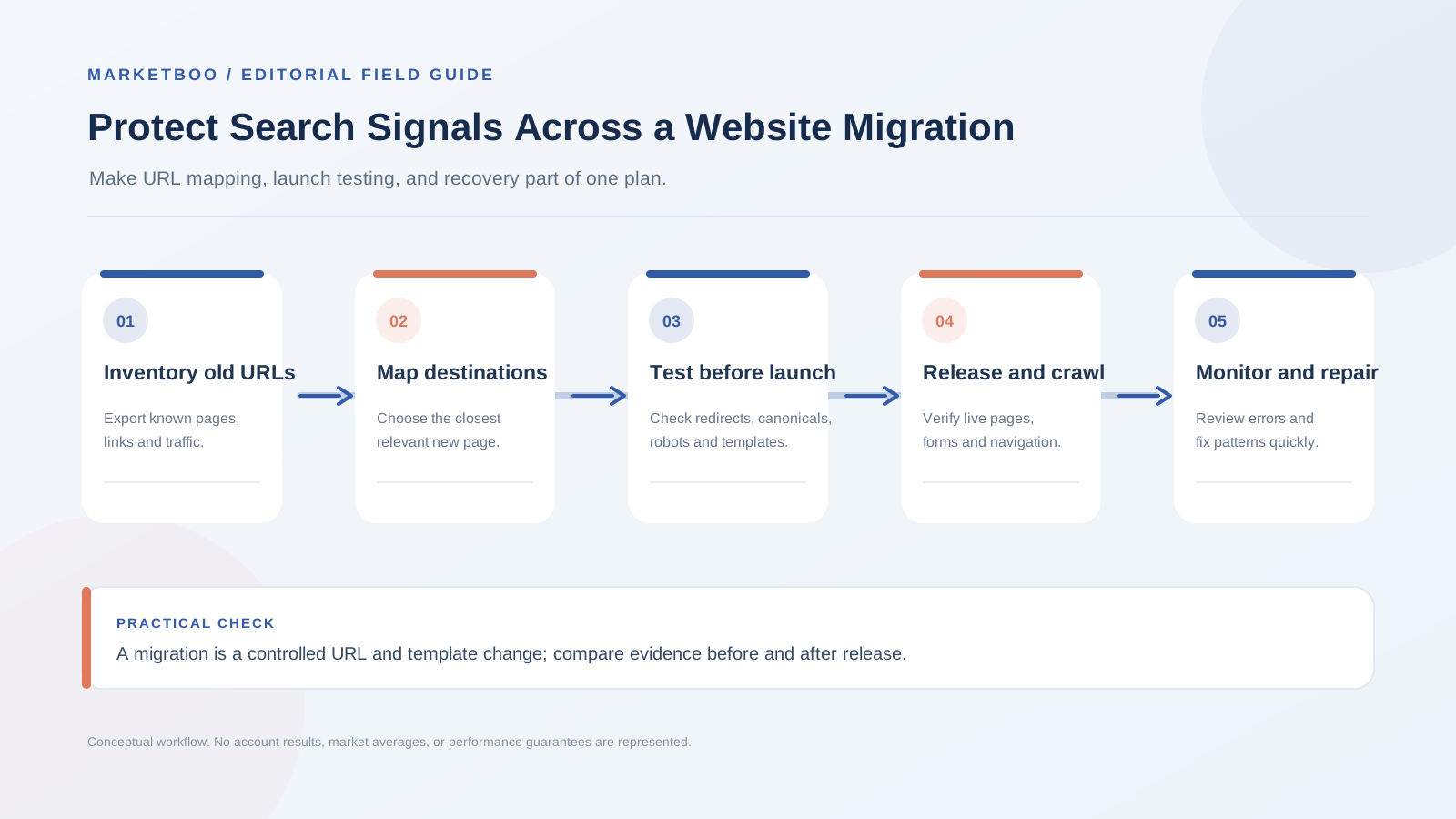
How to run a website migration SEO checklist
- Define the migration type and boundaries. List the domains, subdomains, CMS, URL patterns, language sections, page templates, and content sets that will change. Record launch timing and any business constraints that prevent sequencing.
- Capture a dated baseline. Crawl the live site and combine URLs from Search Console, analytics, sitemaps, backlinks, paid campaigns, support, and sales. Save technical settings and key search and conversion metrics.
- Classify each URL. Decide whether it will remain, move, merge, retire, or require special handling. Include page value, owner, audience, and evidence in the inventory. Do not equate low traffic with no user value.
- Map changed URLs to relevant destinations. Set the closest replacement for every important moved page. Choose a true removal response when no relevant destination exists. Test the mapping for chains, loops, parameters, and wrong page types.
- Prepare and test the staging environment. Check authentication or noindex controls, templates, rendered content, canonical rules, internal links, structured data, forms, mobile behavior, accessibility, and analytics. Remove private customer data from test environments.
- Automate pre-launch checks. Run representative and full redirect tests, crawl staging, validate sitemap and robots rules, confirm production hostname settings, and assign fixes to named owners. Save a launch checklist and emergency contact.
- Release and verify production. Check live responses, SSL, DNS, redirects, indexation directives, canonicals, sitemaps, key forms, tracking, and product actions using real production URLs.
- Monitor Search Console and business outcomes. Compare old and new URL groups, queries, pages, conversions, and markets over time. Note data delays and unrelated releases. Escalate critical patterns with reproducible evidence.
- Fix, retest, and close incidents. Update redirect rules or templates, rerun crawls and form tests, inspect affected URLs, and record the date and result. Keep monitoring until priority defects are resolved and the migration owner closes the log.
Common migration failures and why they happen
Redirecting every old page to the homepage
The homepage rarely answers the same question as a specific product, article, or support page. Redirecting unrelated URLs to it can frustrate visitors and obscure the intended relationship between old and new content. Map to a close replacement when one exists; otherwise make a clear removal decision.
Launching with a staging noindex still in place
A production site can be online and still carry a sitewide noindex or a robots disallow inherited from a development environment. Make indexation directives a release check at both the homepage and key templates. Test through a crawler and inspect headers, not only the CMS settings screen.
Preserving URLs but changing page meaning
A page can keep its URL while its content changes so substantially that it no longer satisfies the old query or user expectation. The URL technically works, but visitors and search systems may perceive it as a different resource. Preserve important content, redirect when the purpose changes, or provide a clear replacement.
Forgetting analytics continuity
A new site may use a different tag, event name, consent tool, or checkout domain. If the team compares pre- and post-launch counts without checking the setup, it may misread instrumentation loss as a business decline. Test the full journey and annotate tracking changes.
Updating the sitemap but leaving old internal links
A sitemap can list the new destination while the site navigation and articles still link through redirects or to removed URLs. Crawl internal links after launch and update high-value destinations. A clean internal architecture reduces friction for users and crawlers.
Removing old content without reviewing demand and support needs
An article may bring little search traffic but still answer a customer question or be linked from product documentation. Review search, support, backlink, and sales evidence. If content is obsolete, decide whether to update, consolidate, or retire it; avoid deleting in bulk without an owner.
Deploying several major changes with no rollback owner
The more variables change at once, the harder diagnosis becomes. A rollback plan should identify who can act, which components can be reverted, what data must be preserved, and how the business will communicate. Test the plan before the release, especially for domain and routing changes.
FAQ
How long should a website migration SEO checklist be?
The checklist should cover the actual scope, not a fixed page count. A small redesign may need URL inventory, technical checks, analytics tests, and post-launch monitoring. A domain and CMS move across multiple markets requires more coordination, legacy URL coverage, international checks, and release owners. Include the relevant tasks and evidence for the project’s page types.
Will a redesign hurt SEO rankings?
Not necessarily, but a redesign can affect URLs, content, internal links, rendering, performance, and indexation. Search systems may need to process changes, and outcomes can vary. Preserve useful page purpose, map moved URLs carefully, test production signals, and monitor results. No checklist can guarantee unchanged rankings.
How long should redirects stay after a migration?
Keep relevant permanent redirects in place long enough to support users and systems transitioning to the new URLs. Do not remove them immediately after launch. The appropriate period depends on the move, external links, user behavior, and platform guidance; assign an owner to review instead of choosing a universal cutoff.
Should every old URL redirect to a new page?
No. Redirect an old URL when a relevant replacement exists. If content is intentionally removed and there is no suitable replacement, use an appropriate not-found or gone response. Redirecting unrelated pages to the homepage can mislead visitors and does not preserve the original purpose.
Should a staging website be blocked from Google?
Staging should not be unintentionally indexed. Teams can protect it with authentication or other access controls and appropriate crawl directives. The production launch must then remove the staging protections that should not apply. Verify the live site’s robots and noindex settings after release; robots.txt alone is not security.
What should a team monitor after launch?
Monitor uptime and response codes, redirect behavior, crawl and index reports, Search Console performance, organic landing sessions, form and trial events, CRM outcomes, and support reports. Compare mapped URL groups and segments. Use evidence from several systems because no single dashboard shows the entire migration effect.
Should the old and new domains both be in Search Console?
For a domain move, keep access to both properties so the team can review old and new site behavior and follow current Google instructions. Verify ownership before the migration and submit relevant sitemaps. Use the Change of Address tool when it applies to the move. The tool is not a replacement for redirects or QA.
Protect both the launch and the learning
A careful migration keeps the team from treating search visibility as an afterthought. It documents the site before it changes, maps useful URLs to relevant destinations, verifies public and private boundaries, tests the live release, and gives every incident an owner. After launch, the same baseline lets the team distinguish a technical defect from a broader market or performance change.
If a redesign or platform move needs coordinated search and content planning, explore Marketboo’s SEO and GEO services. For a migration that also requires a new WordPress or Shopify build, review website development services and prepare the URL inventory before kickoff.
This is the practical role of website migration SEO checklist: guide a clear next action and make the result measurable.