

A SaaS technical SEO checklist should answer a concrete question for every important page: can search engines discover it, fetch it, render its main content, understand its preferred URL, and see why it belongs in the public search index? For software websites, this means checking product and use-case pages, integration directories, documentation, account areas, JavaScript behavior, duplicate templates, sitemaps, and page experience. Technical checks are most useful when they identify evidence, impact, owner, and a way to retest after a fix.

A common SaaS debugging story begins with a new feature page that looks correct in a developer’s browser but does not appear in search. The first response is often to rewrite the copy. Yet the cause may be that the route is blocked, the rendered HTML lacks its main text, the page points its canonical to a different URL, a noindex tag slipped into production, or the page has no useful links pointing to it. Technical SEO is the work of separating these causes before anyone rewrites good content or ships a second version of the same page.
A software company also has unique URL patterns. Public marketing pages may live beside a web app, documentation system, help center, integration library, changelog, and regional subdirectories. These parts may have different templates and release schedules. A blanket rule that indexes every route or blocks every route can create problems on either side. The goal is to make useful public information accessible while preserving privacy, security, and product integrity for logged-in users.
Google describes Search as a process that includes crawling, indexing, and serving results.[1] Passing one step does not guarantee the next. A URL can be fetchable yet not indexed; an indexed page may not appear for a query; and a page can change without the search result updating instantly. Technical checks should therefore distinguish observable evidence from the outcome the team hopes to see.
SaaS page types need different technical treatment
Start by inventorying page families, not simply counting URLs. A thousand URLs may be a healthy documentation library, a collection of useful templates, a parameter-generated duplicate set, or private app routes accidentally exposed to crawlers. The page type tells the team what the URL is for and which indexation rules need review.
| Page family | Typical search purpose | Technical questions to verify | Frequent failure mode |
|---|---|---|---|
| Home, feature, and solution pages | Explain product, capabilities, and use cases | Crawlable links, stable URL, rendered content, canonical, status | Main message exists only in a script or image |
| Industry or role pages | Explain a distinct audience workflow | Unique evidence, internal links, indexation, template output | Many near-identical pages with swapped labels |
| Integration pages | Explain supported connections and setup | Accurate route, canonical consistency, supported state, documentation links | Generated URLs promise unsupported integrations |
| Documentation and help | Teach setup, use, and troubleshooting | Access behavior, canonical domain, cross-site links, version handling | Duplicate versions or obsolete docs remain indexable |
| Pricing and comparison pages | Support evaluation and purchase decisions | Current content, correct canonical, structured data only if eligible | Cached or duplicated prices, outdated vendor claims |
| Web app and account routes | Serve authenticated customer tasks | Authentication and authorization, privacy, robots and indexation boundaries | Private routes exposed or thin UI routes crawled |
| Search, filter, and parameter URLs | Help users find site content | Parameter handling, crawl paths, duplicate signals | Unbounded URL combinations create crawl waste |
| Changelog and release notes | Describe product changes over time | Date and version accuracy, canonical, navigation | Updates lack context or duplicate announcement content |
The table is a starting map. A documentation domain may be intentionally indexable while its search results pages are not. A public demo may be useful to crawl but should not expose personal or account-specific data. A sign-in screen may need an accessible help link but not a search-optimized article. Have engineering and security review the boundary; a robots rule is not access control.
Diagnose discovery, crawling, and indexing separately
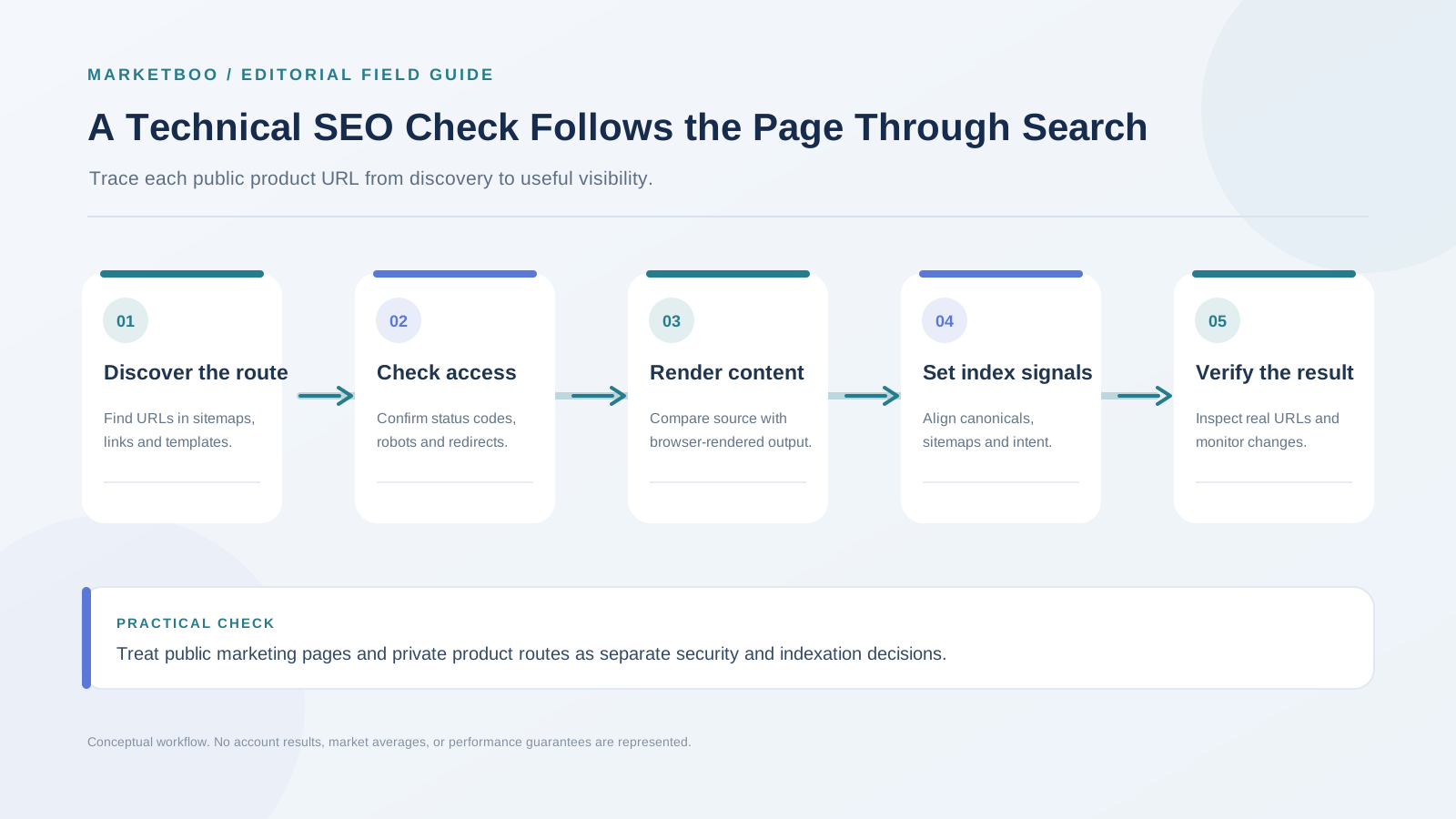
A good incident investigation proceeds from the simplest evidence to the more complex. First check the exact URL and response: is it live, does it return a successful status, and does it redirect where expected? Next inspect internal links and sitemap presence. Then review robots rules, meta robots, X-Robots-Tag headers, canonical declarations, and rendered content. Finally, use Search Console URL Inspection and the page’s indexing reports to understand what Google reports about that URL. Each tool reveals only part of the path.
A `robots.txt` disallow can prevent crawling, but it does not reliably remove a URL from search if other pages link to it. If a page must be kept out of search, use an appropriate noindex mechanism that the crawler can fetch, or require authentication for private content. Do not block crawling of the page in a way that prevents a crawler from seeing its noindex directive. Google documents robots directives and the difference between crawling and indexing.[2]
A noindex directive should be used intentionally and tested on the live version. It may appear in an HTML meta tag, a response header, or a CMS field. A staging environment can have different settings from production, so validate both the deployment pipeline and a representative public URL after launch. Accidentally shipping a sitewide noindex is a serious release defect; an owner should include it in launch QA.
HTTP status codes matter. A page that should exist should usually return a successful response; a removed page should not silently show a generic message with a 200 code; a moved page should redirect to its closest relevant replacement. A 404 is not automatically an SEO failure when the content is intentionally removed. It becomes a problem when a valuable live page or a key internal destination returns an error unexpectedly.
Canonicals need consistency across page content, redirects, internal links, and sitemaps. A canonical element is a preference signal and may be interpreted with other signals; it is not a command to ignore every conflicting URL. Check that the canonical URL is absolute, returns the intended page, uses the correct protocol and host, and is not pointing across unrelated product pages. Google’s canonical guidance explains how duplicate URLs are consolidated and why consistent signals matter.[3]
Rendered JavaScript pages before rewriting them
A modern app can look complete to a person while its initial HTML contains almost no meaningful text. Search engines may process JavaScript, but a rendering failure, blocked resource, client-side route issue, or delayed API response can change what they receive. Before revising copy, compare the raw response with rendered output and identify whether the title, main heading, copy, links, and canonical appear after rendering.
Use a rendered page inspection tool to view what Google can access, then compare with an ordinary browser and the server response. Check the console and network requests when content is missing. Confirm that important resources are not blocked, API calls do not require a logged-in state, and navigation uses crawlable links. A button that changes state without a link may work for a user but provide no crawlable route to a distinct public page.
Google’s JavaScript SEO documentation describes how it processes JavaScript and provides testing guidance.[4] The best implementation depends on product architecture, deployment frequency, caching, and user experience. Server-side rendering and pre-rendering are options, not universal requirements. Whatever the approach, test the final output and ensure the page remains useful when scripts are delayed or fail.
Watch for hydration mismatches and route changes. If the page initially renders one title or canonical and then replaces it after JavaScript executes, verify which version is delivered in the rendered output. Single-page apps can create multiple states without creating distinct URLs; crawlers and users need a clear URL for content that should be shared or indexed. Conversely, not every tab or filter state deserves a separate indexable page.
Forms and gated experiences require special care. A public page can describe an offer and provide a form, while the submitted result or personalized application content stays private. Do not rely on a client-side check to protect sensitive data. Authentication must be enforced on the server or by a secure service. Search visibility goals do not justify removing access controls.
Keep useful and private content in the right indexation boundary
A SaaS website can have indexable docs and non-indexable app screens under the same domain. Use URL patterns and technical controls that clearly separate these experiences. If a page contains customer-specific data, it should require appropriate access authorization. A robots rule may reduce crawling but does not secure the information. Developers should treat every URL as potentially discoverable and enforce permission checks independently.
For public documentation, think about versions and duplicate content. If old product versions need to remain available for current customers, decide whether each version should be indexed, canonicalized, or linked from a version selector. Do not redirect every older page to the current docs if the instructions no longer match a customer’s software. A version switcher, clear labels, and accurate titles can help users and crawlers understand which document applies.
For user-generated content or community discussions, define a moderation and indexation policy. Pages with substantial, useful answers may support discovery; empty tags, spam, private discussions, or duplicate search results may not. Be cautious with infinite scroll and load-more patterns: important content should have accessible links or other discovery paths that do not depend solely on a user action a crawler cannot execute.
Audit templates, integrations, and programmatic routes
SaaS websites often generate pages from product data. This can help scale accurate information, but template quality matters. Inspect a representative sample and ask: does the page offer distinct utility, is the underlying data current, can a buyer verify the claim, and can the company maintain it? If every integration page only swaps a partner name into a generic paragraph, the set may provide little value and can become stale.
A useful integration page can describe whether the connection is native or third-party, setup prerequisites, data flow, sync direction, permissions, plan requirements, known limits, troubleshooting, and links to current documentation. An unsupported integration page should be removed or redirected to a meaningful alternatives explanation. An inaccurate claim can cause product support issues beyond search.
Template QA should include unique title and heading logic, canonical behavior, breadcrumbs or internal links, structured data eligibility, and status-code checks. If a page is missing required data, do not create a thin record just to fill the directory. Consider showing the page only after there is enough verified information. For multiple routes that differ only by filter parameters, decide whether they need crawlable URLs, canonical consolidation, or a user-only interface state.
Structured data should match content actually visible on the page and follow current feature-specific rules. Google’s general guidelines state that structured data does not guarantee a rich result and that misleading markup can be disallowed.[5] SaaS marketing teams should not mark up unsupported review ratings or product facts simply because a schema generator offers a field. Validate changes and keep the markup current when the visible page changes.
Sitemaps and internal links should agree
An XML sitemap is a discovery aid that lists URLs the site considers important, but it does not force a page into the index. Include canonical, useful, indexable URLs that return successful status. Remove redirected, error, noindex, duplicate, and private routes. Keep last-modified values meaningful; do not update every URL timestamp on every deployment if the content has not materially changed.
Internal links show both users and crawlers how pages relate. Important product and help pages should be reachable from relevant navigation, category hubs, or contextual links. Avoid orphaning a new feature page and expecting a sitemap to do all the discovery work. Anchor text should describe the destination; excessive repetitive anchors can make site navigation harder to read.
When a page moves or is consolidated, update internal links so they point directly to the preferred destination. Redirect chains add complexity and can cause a poor user experience. A redirect should lead to the closest relevant replacement rather than a broad homepage when the original page had a specific purpose. Google’s redirect guidance covers permanent and temporary redirects and common implementation considerations.[6]
Make Core Web Vitals part of release quality
Google’s field guidance describes these thresholds as good at the 75th percentile.[9] Field data helps assess real visitors; lab tests can help reproduce a defect. Meeting a threshold is a diagnostic target, not a promise of a ranking change.
| Core Web Vital | Good field threshold | What the signal describes |
|---|---|---|
| Largest Contentful Paint (LCP) | 2.5 seconds or less | How quickly the main content appears |
| Interaction to Next Paint (INP) | 200 milliseconds or less | How promptly the page responds to interaction |
| Cumulative Layout Shift (CLS) | 0.1 or less | How much visible content shifts unexpectedly |
Compare the same URL group and device context across releases. If field data is sparse, say so and use repeatable lab tests to investigate; do not describe a small sample as a site-wide outcome. A sluggish or unstable page can frustrate a buyer before they reach a demo form. For a SaaS marketing site, common causes include oversized JavaScript bundles, late-loading fonts, third-party chat tools, layout shifts from images or banners, and forms that respond slowly. Core Web Vitals give teams a field-oriented way to assess loading, interaction responsiveness, and visual stability. They do not replace accessibility, content quality, or conversion testing.
Use field data when available to understand real user conditions, and use lab tools to diagnose what might be causing an issue. Test mobile and desktop, but prioritize actual visitor experience over improving a synthetic score with changes that make the site less useful. For example, removing a clear product video may improve a lab metric while making the page harder to evaluate; better video delivery or a descriptive text alternative may solve both problems.
Set performance budgets with engineering based on architecture and user needs. Track major changes such as a new analytics library, sales chat, personalization layer, or interactive demo. Confirm that optimization does not hide content, break form validation, or load essential copy only after a long request. Google describes Core Web Vitals as part of page experience, while noting that page experience involves more than one metric.[7]
A technical incident runbook
When an important page stops receiving organic visibility or traffic, avoid jumping straight to a rewrite. Capture evidence first, then isolate the layer that changed.
| Signal | First check | Common causes | Owner | Retest evidence |
|---|---|---|---|---|
| URL disappeared from index report | URL Inspection and live status | noindex, redirect, canonical, crawl block | SEO and web engineering | live inspection, crawl, index report after processing |
| Page loads without main text in rendered view | raw HTML, rendered HTML, network requests | blocked JS/API, hydration failure, client-only content | Frontend engineering | rendered content, console and request health |
| Search result uses an unexpected URL | canonical, redirects, internal links, sitemap | conflicting signals, duplicate routes, parameter variants | SEO and platform engineering | canonical audit and crawl of all variants |
| Many thin integration URLs appear | template sample, source data, internal links | generated pages without distinct verified detail | Product marketing and engineering | sampled page review and indexation status |
| Crawl errors rise after release | deployment diff, logs, status code sample | route change, broken navigation, server errors | Release owner | crawl comparison and server response checks |
| Organic landing conversions decline | analytics, form and CRM tests | broken event, form failure, page change, traffic mix | Analytics, growth, web team | end-to-end test and reconciled CRM event |
| Mobile layout shifts or interaction slows | field and lab performance data | late assets, scripts, font or widget behavior | Frontend engineering | repeat field monitoring and device test |
This is a triage table, not a claim that every symptom has one cause. Capture the date of first change, affected URL sample, product release, CMS release, analytics changes, and traffic segments. Compare the pages that changed with similar pages that did not. If both search clicks and non-search conversions fall, an on-site defect may be more likely than a search-only issue. If clicks fall only for a specific page group, inspect its query mix and indexation signals.
How to use a SaaS technical SEO checklist
- Build a page inventory. Export known URLs from the CMS, sitemap, crawler, Search Console, and web analytics. Label each URL by product page type, owner, intended audience, and desired indexation status. Reconcile routes that exist in multiple systems.
- Select representative templates. Include home, feature, integration, docs, pricing, comparison, localized, and app routes where relevant. Sample both recently changed and stable pages. A template sample makes investigation manageable while still surfacing systemic problems.
- Test access and status. Request each URL without an authenticated session and record status, redirect destination, robots response, and headers. For private routes, verify actual server-side authorization. Document redirects and error pages rather than assuming the browser view is enough.
- Inspect crawl and index signals. Review robots.txt, meta robots, X-Robots-Tag, canonicals, sitemap membership, hreflang if applicable, and internal links. Search Console’s URL Inspection can provide Google’s reported state for individual URLs; it is not a substitute for a full crawl.
- Compare source and rendered content. Check title, meta description, H1, key body content, links, structured data, and canonicals in raw and rendered output. Review console or network failures for JavaScript pages and confirm that content does not depend on an unavailable private API.
- Review template uniqueness and evidence. Look for near-duplicate pages, stale features, unsupported integrations, empty product records, and claims that lack an owner. Decide whether to improve, consolidate, noindex, redirect, or remove each template group.
- Check performance and usability. Review Core Web Vitals data where available, mobile rendering, keyboard use, form flow, layout stability, and interaction delays. Confirm performance work does not reduce access to important content or functionality.
- Create a prioritized ticket list. For each finding, record evidence, affected URLs, business impact, urgency, owner, dependency, and validation method. Separate broad defects from one-off content issues so engineering can identify systemic changes.
- Retest after implementation. Crawl the changed URLs, inspect live rendered output, test forms, validate redirects and canonicals, check sitemap membership, and monitor Search Console after the systems process the changes. Keep before-and-after evidence in the ticket.
A useful backlog prioritizes by impact and confidence, not by how technical a recommendation sounds. A sitewide noindex or broken route deserves immediate attention. A small title tweak across a low-value page may wait. If the evidence is uncertain, label it and plan a test instead of presenting a guess as a defect.
FAQ
What belongs on a SaaS technical SEO checklist?
Review public URL discovery, crawlability, status codes, redirects, indexation directives, canonicals, sitemap membership, internal links, JavaScript rendering, structured data, page performance, mobile usability, and form tracking. Include product-specific routes such as feature, integration, documentation, pricing, and app pages. Record evidence, owner, impact, and a retest for each issue.
Should SaaS login pages be indexed?
A public sign-in page may appear in search if it is accessible and useful, but the authenticated product and private user data should remain protected. Do not assume robots.txt or a noindex tag secures private content. Enforce authentication and authorization on the server, and decide indexation for each public and private route intentionally.
Does Google index JavaScript SaaS websites?
Google can process JavaScript, but implementation details affect what it can render and index. Test the rendered output, key resources, route links, canonical, and main content. A page that looks complete in one browser may still have blocked requests or client-side issues that prevent reliable discovery.
Should all feature and integration pages be indexed?
Only index pages that are public, useful, accurate, and intended to serve as search results. Feature pages should explain distinct capabilities. Integration pages should describe supported behavior and relevant details. Empty, duplicated, stale, private, or unsupported pages may need consolidation, removal, or noindex treatment.
Does a sitemap guarantee indexing?
No. A sitemap can help search engines discover URLs, but inclusion does not guarantee crawling, indexing, or rankings. Keep the file focused on canonical, indexable pages that return the intended status, and support discovery with internal links.
How should a SaaS site use canonical tags?
Use a canonical to indicate the preferred URL among duplicate or similar versions, and keep redirects, internal links, sitemaps, and page signals consistent with that choice. A canonical is a signal rather than a way to fix every duplicate problem. Verify that it points to a relevant page that returns the expected response.
What is the difference between robots.txt and noindex?
Robots.txt controls crawler access to paths, while a noindex directive tells a crawler that can fetch a page not to include it in search. A robots block can prevent a crawler from seeing a noindex tag. Neither robots.txt nor noindex should be used as a substitute for authentication and authorization on confidential content.
Make every technical finding testable
A SaaS technical SEO checklist is valuable when it turns symptoms into evidence and evidence into work someone can validate. Separate discovery from indexing, raw source from rendered output, public pages from private app routes, and a platform signal from a business outcome. Then focus on the URLs that matter to buyers and make sure product, engineering, SEO, and analytics owners can act together.
If your team needs help identifying crawl, indexation, or product-page issues, explore Marketboo’s SEO and GEO services. For a site rebuild or template issue that involves design and development as well as search, see website development services and request a scoped technical review.