
To track ChatGPT traffic in GA4, start with session source and medium in the Traffic acquisition report, then create a consistent view of identifiable referrals from ChatGPT and other AI services. Compare sessions, engaged sessions, landing pages, and defined conversions by source. This captures visits when the referring application passes attribution information to the website. It does not show every answer that mentions a brand, every citation, or traffic whose referrer is removed. Treat GA4 referral data as observable visits, not a complete measure of AI visibility or influence.

Interest in generative search has created a measurement problem that marketers often compress into one question: “How much traffic does AI bring us?” The answer depends on what “AI traffic” means. A referral click from ChatGPT is an observable session. A brand mention inside an answer may never lead to a click. A citation may be seen but not used. A user may see an answer on a phone, switch to a different browser, search the brand separately, and arrive through direct or organic traffic. GA4 can report some website visits and events; it cannot reconstruct exposures that never reached the website or where the source information was lost.
This distinction helps teams avoid overstating what their numbers mean. The goal of this guide is to build a repeatable report for identifiable AI-related sessions, examine what those visitors do, and keep separate measures for citations or answer visibility. The setup uses GA4’s acquisition reporting and, where appropriate, a controlled event or UTM scheme. It also explains why missing referrals do not prove that a platform sent no visitors.
What GA4 can and cannot see
Google Analytics collects information through measurement code and available browser or app data, then uses traffic source dimensions to describe how sessions arrive. The Traffic acquisition report focuses on session-scoped sources and mediums; other reports may use different attribution scopes.[1] A visitor who arrives from a link in an AI answer may appear with a source such as `chatgpt.com`, `perplexity.ai`, or a related host, depending on the platform, browser, link wrapper, and referrer behavior. A session may also appear as referral, direct, or another source if the information is absent or transformed.
GA4 can help answer questions like these:
- How many observed sessions came from known AI product domains during a defined period?
- Which landing pages received those sessions?
- Did observed visitors engage, view key product pages, start a trial, or submit a demo request?
- How did identifiable referral sessions change by source, device, market, or landing page?
- Do AI referral sessions behave differently from comparable organic, direct, or referral sessions in the current reporting setup?
GA4 cannot reliably answer from referral data alone:
- How often an AI product mentioned the brand without sending a click.
- How many people saw a citation or answer but did not visit the site.
- Whether a session with no referrer was actually influenced by an AI answer.
- Which exact prompt or conversation produced a click unless the platform explicitly provides and passes that information.
- Whether AI exposure caused the eventual conversion rather than another touchpoint.
- The total volume of AI citations across platforms, models, users, and contexts.
Keep these boundaries beside the report. A clean chart can look authoritative while measuring only a narrow slice. The label should say “identified AI referrals” or “sessions from selected AI domains,” not “all AI search traffic” unless a broader measurement method truly supports that claim.
Choose what counts as an AI-related visit
There is no universally maintained list of domains that captures every AI search surface. A platform may use different hosts for web search, mobile app, redirects, browsing, or regional access. Providers can change their domains, and users can copy links into other applications. Create a list based on observed traffic and update it with evidence.
| Reporting group | Examples of observable values | Use in analysis | Caveat |
|---|---|---|---|
| ChatGPT-related referrals | `chatgpt.com`, legacy or product-specific OpenAI domains if observed | Measure identifiable sessions passing a ChatGPT-related referrer | Hostnames and referrer behavior can change |
| Perplexity-related referrals | `perplexity.ai` or observed subdomains | Track identifiable referral sessions from the service | A source label does not disclose prompt or citation context |
| Microsoft AI surfaces | Observed Copilot or Bing hosts | Group only when the referring source is clear enough for the reporting question | Browser and search integrations can make source classification ambiguous |
| Google AI search experiences | Sessions attributed to Google Search | Usually report within Google organic/search attribution rather than a separate “AI” bucket | GA4 source may not reveal whether an AI Overview appeared |
| Other assistant or answer engines | Domains verified from current referral reports | Add to an “other AI referrals” group when evidence supports it | Unknown or unreferrer visits are not classifiable by guesswork |
Do not automatically treat every source containing words such as “ai,” “bot,” or “assistant” as a human referral from an answer engine. Some domains may be crawlers, products, analytics tools, or unrelated software. Inspect hostnames and landing sessions before adding them. Where the source is ambiguous, retain it as a separate row or use a conservative “unclassified referral” group.
A practical source list can have three layers: known platform referrals, traditional search sources, and unclassified traffic. This helps separate evidence from inference. If a user clicks an AI citation link, a referral may be recorded. If the user copies a URL or later types the domain, GA4 may not preserve the earlier context. That session belongs in whatever source classification the collected data supports, not in a fabricated AI segment.
Build the core report in GA4
The quickest baseline is the Traffic acquisition report. In GA4, open Reports, expand Acquisition, and select Traffic acquisition. Set the date range and use session source / medium as the main dimension. Search for observed AI-related hostnames, compare them with the total sessions, and add the metrics needed for the decision. Google documents the report’s acquisition dimensions and session-scoped view.[1][2]
A useful first view includes sessions, engaged sessions, engagement rate, average engagement time, key events, and session key event rate if those metrics are configured and appropriate to the site. Add landing page as a secondary dimension or use an Exploration to compare which pages receive visits from selected sources. Avoid copying a GA4 chart without noting the date range, filters, and source classification list.
A report specification should define:
- Question: What decision will this report support?
- Date range: Which period is being compared, and how do you account for seasonality or product launches?
- Scope: Is the report session source, first user source, or a data-driven attribution report?
- Source list: Which observed hostnames are included, and when was the list reviewed?
- Metrics: Are you counting sessions, users, engaged sessions, key events, or conversions?
- Filters: Which internal, test, developer, or duplicate traffic is excluded?
- Outcome definitions: What exactly qualifies as a trial, demo, purchase, or other action?
- Limitations: Which exposures and unattributed visits remain invisible?
For a saved report, use the report customization controls if your property permits them, or build an Exploration with session source / medium and landing page dimensions. Google’s Explorations can combine dimensions and metrics for flexible analysis, but availability depends on the selected technique and property data.[3] Exporting data to BigQuery may help with deeper event-level analysis if the property is linked and the team understands the schema; it still does not recover information that was never collected.
Group AI referrals without hiding the underlying source
For recurring analysis, a source grouping or custom channel group can make a selected set of AI domains easier to review. Set clear rules and keep the original session source / medium available. If a channel definition simply groups any referral containing a chosen substring, it can sweep in unrelated sources. Document the rules and test them against existing data before relying on the group.
An alternative is an Exploration or Looker Studio view with a source list. This can be more transparent because reviewers can see which hostnames are included and how each is treated. Use a table alongside any trend chart. When traffic is sparse, counts and landing pages are more useful than a smoothed line that implies a stable pattern from a few sessions.
Do not merge AI referrals with organic search by default. A click from an assistant may be a referral; a click from Google Search may be classified as organic search even if an AI-generated result appeared on the page. GA4’s source dimension typically identifies the source of a session, not the exact search result feature. If the business wants to study AI Overviews or other Google search features, Search Console and other current platform reporting may provide partial evidence, but they should be labeled according to what they measure.
Keep branded and nonbranded organic comparisons separate where Search Console data supports the distinction. AI referrals and organic search can influence one another, but combining them into one total removes useful context. Report raw source sessions first; if you create a broader “AI-influenced” model, present the assumptions and methodology separately from the directly observed report.
Use UTMs carefully
UTM parameters can identify a campaign when the link creator controls the URL. They are useful for a company’s own links from newsletters, social posts, webinars, partner campaigns, or controlled placements. They do not generally let a website add tags to citations authored by an AI platform. Do not imply that UTM tagging can reveal traffic from every AI answer.
If Marketboo or another brand publishes its own links in an AI-facing context—such as a newsletter, partner page, or promotional resource—it can use a consistent UTM convention to distinguish that campaign. Google Analytics documents how campaign parameters populate traffic source dimensions.[4] Keep parameter names lowercase and consistent, avoid personal or sensitive information in URLs, and test that redirects preserve query parameters when intended.
Use UTMs only when the team controls the link or campaign. Adding UTMs to internal navigation can overwrite acquisition attribution and make reports harder to interpret. Do not add tracking parameters to canonical product URLs without a reason. If an AI platform generates links without your control, observe the referrer when it is available and accept that attribution gaps remain.
Track outcomes without overstating attribution
For an AI referral report to help a business, it needs more than a session count. Define a small set of meaningful outcomes and verify that events represent completed actions. A demo event should not fire when the form merely becomes visible. A trial start should have a deduplication rule. Key event names and rules should stay stable or be annotated when changed.
GA4 supports key events and reporting on those events in acquisition views.[5] A key event is a defined event important to the business; it is not automatically a qualified lead, opportunity, or customer. If the event fires on an incomplete submission or duplicate click, the report can overstate performance. Test the path from landing page to confirmation and reconcile CRM records for lead forms.
An example reporting table might look like this:
| Source group | Sessions | Engaged sessions | Landing pages with sessions | Demo requests | Sales-accepted demos | Reading of result |
|---|---|---|---|---|---|---|
| Identified ChatGPT referrals | Observed count | Observed count | Actual landing URLs | Validated event count | CRM-reviewed count | Referral visits only; not every ChatGPT mention |
| Identified Perplexity referrals | Observed count | Observed count | Actual landing URLs | Validated event count | CRM-reviewed count | Small samples may vary substantially |
| Identified other AI referrals | Observed count | Observed count | Actual landing URLs | Validated event count | CRM-reviewed count | List the included domains beside the row |
| Organic search | Observed count | Observed count | Search landing URLs | Validated event count | CRM-reviewed count | Includes search sessions not separated by result feature |
| Direct or unclassified | Observed count | Observed count | Actual landing URLs | Validated event count | CRM-reviewed count | May contain unattributed influence, but cannot be assigned to AI |
Do not fill this table with invented benchmarks. Use actual property data, label the period, and show small counts as counts. If CRM status takes weeks to mature, display the cohort date and distinguish pending records from accepted or rejected outcomes. A handful of sessions can generate a conversion-rate swing that looks large but is not stable.
Attribution model choices can affect how credit is distributed across observed touchpoints. GA4 documents attribution reporting and models, but a model does not reveal unobserved exposures or prove causality.[6] For some decisions, session source provides an understandable view of the landing visit; for others, a multi-touch report may be relevant. State which question the selected scope answers and avoid presenting modelled credit as a directly observed fact.
Reconcile GA4 with external visibility monitoring
Traffic reports measure visits to your site. They do not measure the number of times an AI system named the brand, cited a page, summarized a claim, or presented a competitor. To study those outcomes, maintain a separate and explicitly scoped monitoring process. Record the platform, query or prompt set, date, geography or language where known, whether the brand appears, whether a URL is cited, and how the result was checked. Sampling should be repeatable because generative responses can vary by time and user context.
A manual sample is not an estimate of every possible answer. Search prompts can be selected to reflect customer questions, product comparisons, and brand queries, but do not extrapolate a small prompt set to total platform visibility. If a third-party monitoring vendor is used, ask how it selects prompts, captures responses, resolves citations, and handles personalization or variation. Keep its data separate from GA4 until the relationship has been demonstrated.
Referral reporting describes visits that reach the website with attribution context; it does not describe unclicked mentions or impressions. Platform-specific behavior can change, so test actual links and referrer values from current products. Do not assume every AI provider exposes identical attribution fields.
Search Console and GA4 answer different questions. Search Console reports performance on Google Search, while GA4 reports activity on the website. A search impression does not equal a session, and a session does not reveal which result presentation the visitor saw. Compare the systems as complementary evidence, not as matching counts.
Diagnose changes in AI referral traffic
If a source grows or falls sharply, validate the measurement before proposing a content explanation. Check whether a hostname changed, a referral exclusion was updated, a redirect started stripping referrers, a reporting filter changed, a consent experience altered collection, or a property tag was modified. Compare the raw source and medium values before reviewing the channel group.
Then inspect landing pages and user paths. A sudden increase to a generic homepage could be a platform or reporting change rather than stronger interest in product information. A fall in one landing page may indicate a broken URL, changed citation, product launch, or ordinary variation. Review server availability and form completions before interpreting conversion rates.
Use a simple incident worksheet:
| Check | What to inspect | What it helps rule out |
|---|---|---|
| Source classification | Raw session source / medium, hostname, channel rules | Misgrouped or renamed traffic |
| Site measurement | Tag status, consent behavior, event changes, internal filters | Data collection defect |
| Link behavior | Redirect chain, query parameters, referrer preservation | Lost campaign or referral context |
| Landing experience | Status, load, page content, forms, mobile usability | Destination or conversion failure |
| Outcome maturity | CRM stage, duplicate rules, cohort age | Premature conversion conclusions |
| External context | Product changes, platform updates, published links | Real change in referral opportunity |
Make no claim that a change in GA4 proves a model update helped or harmed the brand unless the team has a robust design to support that conclusion. Annotate releases, campaign launches, and platform changes. Where the sample is small, report the raw count and say it is directional.
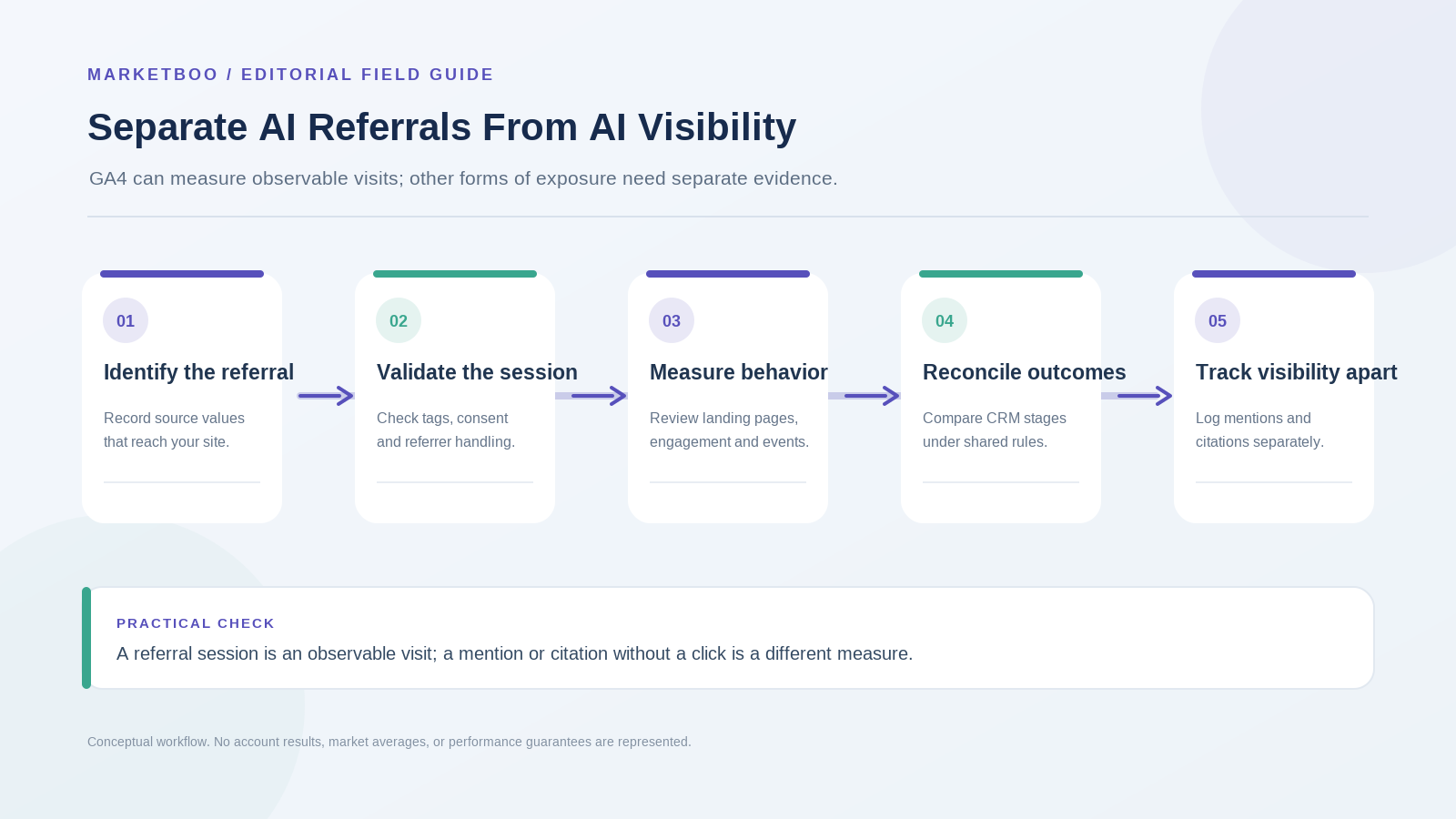
How to track ChatGPT traffic in GA4: a repeatable workflow
- Define the question and boundary. Decide whether the report tracks identified sessions, key events, CRM-qualified outcomes, or external answer visibility. Keep each outcome separate and write the limitation in the report title or notes.
- Check the GA4 implementation. Verify the correct property, web stream, tag, consent behavior, internal traffic filter, referral exclusions, and key-event definitions. Test a normal session and a completed conversion.
- Inspect raw acquisition values. Open Traffic acquisition and review session source / medium for actual AI-related hostnames over a useful date range. Validate that the values are referrals from user visits, not crawler or service traffic.
- Create a documented source list. Record observed domains, grouping rules, examples, review date, and owner. Keep raw source values accessible so the custom group can be audited later.
- Build the report view. Add sessions, engaged sessions, landing page, and validated key events. Segment by source group and compare with organic search and direct traffic only where the question requires it.
- Validate landing pages and events. Open a representative URL, check its response and page experience, submit a test form, and verify event deduplication and CRM handoff. Exclude test conversions from production analysis.
- Add UTM tracking only to links you control. Use a consistent naming convention for your own campaigns, preserve parameters through redirects, and keep sensitive user data out of campaign URLs.
- Reconcile with business outcomes. Review CRM status, qualification reasons, sales cycle, and cohort maturity. Report platform conversions and sales-accepted outcomes separately.
- Separate visibility monitoring. If measuring mentions and citations, store platform, query, date, result, and citation evidence in a different dataset. Do not combine it with session counts as if both were traffic.
- Review and annotate monthly. Recheck source domains and GA4 settings, note product and platform changes, publish the date range and limits, and revise the report when the evidence supports a change.
Common measurement mistakes
Calling all AI influence “AI traffic”
This label mixes referrals, citations, mentions, exposure, and downstream visits. Use a specific name for what the data measures. If the report only shows click-through sessions from several domains, say that.
Assuming direct traffic proves AI influence
Direct traffic can contain visits without a known referrer for many reasons. It may include typed URLs, bookmarks, apps, privacy behavior, or untagged links. It is not a hidden AI category. The team can investigate direct traffic trends alongside other evidence but should not reassign it to AI without support.
Treating a citation as a session
A cited URL can be displayed to many users and receive no clicks, or receive visits that GA4 cannot identify. Visibility monitoring and web analytics count different things. Keep them separate and explain the method for each.
Using a large channel label built from a vague rule
A channel group that catches any source with “AI” in its name can absorb unrelated systems. Maintain a reviewed allowlist of observed hosts and keep the raw dimensions available for audit.
Optimizing on a single event
A page view or button click can be easy to count but not useful to the business. Track meaningful actions, validate completion, and reconcile leads with CRM when appropriate. Do not label every key event as a qualified conversion.
Comparing incompatible periods
Traffic can be sparse, seasonal, and affected by product launches or changing source behavior. Compare like periods when possible, annotate changes, and avoid claiming a trend from a few sessions. A cohort analysis may be more useful than month-over-month percentages for small counts.
Expecting UTMs on links you do not control
A brand cannot append campaign parameters to a citation generated by a third party. Use observed referrer data where it exists. Use UTM parameters only for links the company creates or controls.
FAQ
Can GA4 track ChatGPT traffic?
It can report sessions when a ChatGPT product sends a detectable referrer and the website’s analytics setup collects it. The source may appear under a ChatGPT-related hostname or a broader referral category depending on current platform and browser behavior. GA4 does not measure all ChatGPT mentions, answer impressions, or clicks whose source information is missing.
How do I see ChatGPT referrals in GA4?
Open Reports, select Acquisition, then Traffic acquisition. Use session source / medium and search observed source values such as `chatgpt.com`. Confirm the date range and inspect landing pages and events. The exact hostname can vary, so use values actually present in your property rather than assuming a fixed list.
Does GA4 show AI Overview traffic separately?
Usually GA4 identifies a Google organic session, not whether a visitor clicked a traditional result, an AI Overview link, or another Search presentation. Search Console can show Google Search performance, but reported dimensions do not necessarily identify every result feature. Keep those measures scoped to what the systems expose.
Can GA4 count AI citations or brand mentions?
No. GA4 measures website activity, not answer exposures or unclicked citations. Track mentions and citations through a separate monitoring method that records platform, question, date, result, and cited URL. Treat samples as samples and do not combine citation counts with visits.
Why does some AI referral traffic appear as direct?
A source may be missing or removed before the session begins, the user may open a copied URL, or an app or browser may not pass referrer information. Direct is a classification for traffic without a recognized source under the current setup; it does not identify the user’s original discovery path.
Should I create a custom AI channel group?
It can help if the business has recurring identified referrals and a documented, tested source list. Keep raw source / medium dimensions available, avoid overly broad matching rules, and review the list periodically. If there are only a few visits, a transparent table may be more useful than a custom channel.
Should every AI referral be a key event?
No. Referral source describes how a session arrived; a key event describes an action that matters to the business. Track a valid trial, demo, or purchase event separately, validate that it fires when the action completes, and reconcile with CRM when qualification matters.
Report observable visits, then state what remains unknown
GA4 can help a team understand identifiable visits from AI products when referral information reaches the website. It can show sources, landing pages, engagement, and configured actions. It cannot tell the full story of AI answers, citations, or influence. A credible report preserves that difference, labels its source list, validates key events, and treats low-volume results cautiously.
If your team wants to connect observable referral data with content and answer visibility monitoring, explore Marketboo’s SEO and GEO services. To discuss a measurement setup that fits your current GA4 and CRM events, contact Marketboo with your property, conversion path, and reporting question.
This is the practical role of track ChatGPT traffic in GA4: guide a clear next action and make the result measurable.