
Low quality leads from Google Ads usually point to a mismatch somewhere between the search, the ad, the landing page, the form, and the sales handoff. Diagnose those stages in order before changing bids or replacing the campaign. Agree on what a qualified lead means, inspect the queries that triggered ads, compare the promise in each ad with its destination, test the form and CRM flow, then review sales dispositions by campaign and query theme. Keep, revise, or pause a segment based on evidence. A submission is an initial action, not proof of fit, sales acceptance, or revenue; measure each stage separately.

Why low quality leads from Google Ads need a stage-by-stage diagnosis
When sales says “these leads are bad,” the phrase may describe several different problems. Some inquiries may be outside the service area. Others may ask for the wrong product, be duplicates, use false contact details, or simply arrive too early for a long sales cycle. Sometimes the contact is right but the sales team never received it. A single label hides these differences, and a single campaign edit can make the wrong problem worse.
Start by making the complaint specific enough to investigate. Ask sales to identify a recent sample and record why each inquiry was accepted, rejected, or left pending. Look at the actual search or referral path when available, the ad message, the landing page, the form responses, the CRM record, and the follow-up history. Google Ads offers search-term reporting and conversion measurement capabilities; its versioned API documentation describes both search term data and conversion workflows.12 These records help locate patterns, but a platform report cannot tell you whether a buyer is commercially viable without your company’s qualification rules.
Define lead quality before changing the account
A lead is a person or organization that has taken an identifiable step to ask about a product, service, or offer. A marketing-qualified lead is a status your team assigns when an inquiry meets its agreed initial criteria. A sales-accepted lead is an inquiry that a salesperson has reviewed and agreed to pursue. A qualified opportunity means there is a concrete potential transaction that meets the business’s later-stage requirements. Companies may use other names, but the stages should mean something different.
Lead quality is not a universal score and cannot be inferred from one signal such as a business email address or time on page. A small company can be a strong fit for one offer and a poor fit for another. A personal email can belong to a legitimate buyer, while a business domain can belong to a student, job applicant, or vendor. Define quality around the offer and sales process: relevant need, supported market, viable use case, usable contact path, timing, and any commercial constraints the company actually applies.
Write down the rubric and make it usable. A sales team that has to fill out twenty fields after every call may stop recording useful feedback. Begin with a small set of clear outcomes:
- Accepted: Sales confirms the inquiry fits the target offer and will follow up.
- Pending: There is plausible fit, but a detail or response is still needed.
- Rejected: The inquiry fails a specific agreed rule, such as unsupported geography or unrelated product need.
- Duplicate or existing: The record belongs with an active opportunity, customer, or previously submitted contact.
- Invalid: The information cannot be used after reasonable verification.
- No response: Attempts to reach the contact have not produced a conversation; this is not automatically the same as “bad fit.”
Capture a concise reason alongside the status. “Not qualified” is a status; “requests installation in a country we do not serve” explains what marketing can review. This distinction is important because the correction differs. A geographic mismatch may require campaign settings or clearer coverage information. A technically unsupported application may require exclusions, a product-page change, or a different qualification question. A valid buyer who never responds may require better follow-up rather than a targeting change.
Trace the mismatch one layer at a time
Work from the search that entered the campaign toward the sales outcome. Avoid changing all five layers at once. If you add negatives, replace the ad, rewrite the page, add form fields, and alter bidding together, later results will not reveal which change mattered.
| Symptom in sales review | Possible cause to investigate | Evidence to inspect | First test |
|---|---|---|---|
| Many requests for unrelated products | Search intent or campaign grouping is too broad | Search-term themes, keyword grouping, landing-page destination | Separate or exclude a repeated irrelevant theme |
| Requests from unsupported locations | Geography, language, distribution, or availability is unclear | Location settings, country in CRM, ad and page coverage statements | Narrow targeting or clarify supported markets |
| Personal, student, or job inquiries | Ad promise or page is being interpreted too broadly | Query, message, page copy, form options | Add specific offer language and review exclusions |
| Right company, wrong application | The campaign reaches discovery-stage users without enough qualification | Application details, sales notes, page depth | Add application information and a useful next-step question |
| Good contacts but incomplete RFQs | The form does not request details estimating needs | Form fields, follow-up email volume, quote delays | Add one high-value field or offer a technical consultation path |
| Good inquiries never reach sales | Tracking, routing, notifications, or CRM deduplication is failing | Test submissions, timestamps, CRM logs, owner assignment | Submit controlled tests and repair the handoff |
| Sales rejects leads before contacting them | Qualification rules or response ownership may be unclear | Rejection reasons, assignment rules, follow-up history | Align definitions and review a sample together |
| Platform shows more leads than CRM | Duplicate event firing, lead creation rules, imports, or time-window differences | Event logs, thank-you page behavior, CRM records | Reconcile a small date range and document counting rules |
The table is a diagnostic map, not proof of a cause. Search data and sales outcomes should be connected with consistent campaign identifiers and dates where possible. Google’s documentation explains how conversion actions and offline conversion uploads can be configured, but the implementation requires valid identifiers, timestamps, and event definitions in the advertiser’s systems.23 If data is missing or inconsistent, fix measurement before using the numbers to rank campaigns.
1. Check what people actually searched
Start with search terms or query themes and compare them with the intended customer problem. Check for patterns, not just awkward wording. An isolated query may be unrepresentative. A recurring theme around “jobs,” “repair,” “used,” “training,” or consumer purchase intent can indicate a mismatch when those requests do not fit the offer. In another business, those same words may be legitimate services or product lines.
If the account needs more candidate wording, Google Ads keyword-planning tools can generate ideas; compare those candidates with the terms and lead dispositions the account actually records.5
Keep an exclusion log. Record the term or theme, the evidence that it is unqualified, the date it was added, and the person who reviewed it. Google’s campaign-criteria resource describes configured targeting and negative-criteria fields, but whether a term should be excluded is an account decision.6 That log makes it easier to reverse an overbroad exclusion. A word can appear in both a bad query and a valuable technical query, so review the whole phrase and context before blocking traffic. If the platform’s reporting does not reveal every query, do not claim that the visible sample represents all campaign activity.
Also check campaign structure. If unrelated offers, markets, and stages are merged, the team may not be able to see which message attracted which inquiry. A broad campaign is not automatically a mistake, but grouping should make the results more interpretable. Separate a segment when it needs its own budget, message, page, sales routing, or qualification rules—not simply because its keywords look different in a spreadsheet.
2. Compare the ad promise with the page
An ad can attract the wrong prospect because the offer is ambiguous. “Get a quote” might attract a buyer ready to purchase, a consultant researching pricing, and a consumer looking for a one-off service. The destination should specify who the offer serves, what is included, the geographic limits, and what information is needed for the next step.
Review the journey on a phone as well as a desktop. Confirm that the page loads, the form can be completed, validation messages are clear, and the submit action produces a reliable confirmation. Check whether the right team receives the information. If ads promise a guide, consultation, quote, or demo, verify that the destination actually provides that next step.
An effective page does not need to be long. It needs to resolve the questions that matter to the offer. For a complex B2B service, useful information may include fit criteria, process, deliverables, service areas, exclusions, and what happens after a request. For a product, it may include the range, specifications, compatibility, and support conditions. Keep claims specific enough that a buyer can tell whether the offer applies to them.
3. Inspect the form and qualification friction
Forms can create both low-quality submissions and lost good leads. A form that asks almost nothing may invite accidental or noncommercial requests. One that asks for excessive detail may block a real buyer who is still exploring. Ask why each field exists and who uses the answer. Keep required fields limited to information necessary for initial routing or evaluation; collect more during the conversation when that is reasonable.
Where appropriate, explain the choices in ordinary language. A “company size” dropdown may help route an enterprise offer, but it may make no sense for an industrial quote. “Product category,” “country,” “application,” “quantity range,” or “project timing” can be more directly useful when sales can use them. Do not ask prospects for sensitive information unless the business has a clear need and an approved process to handle it.
Consider a branching or two-path experience only if it reduces confusion. A visitor with a defined specification may need to send a drawing or request a quote. A visitor who does not know which option fits may need a short consultation. Giving both people the same form and same immediate sales expectation can create frustration on both sides.
4. Verify tracking and CRM handling
Not every perceived lead-quality issue originates in targeting. Duplicate conversion events can make the account appear to have more inquiries than the CRM contains. An offline import can count the same event more than once if the implementation does not use stable identifiers or follow the platform’s rules. A CRM can create duplicates, assign the wrong owner, or fail to preserve campaign details.
Test the full journey with a controlled submission. Confirm when a conversion event fires, whether refreshing a confirmation page repeats it, whether CRM records are deduplicated, and whether the lead is assigned to the right person. Compare one specific time period across website analytics, ad reporting, and CRM. Differences may reflect attribution windows, date boundaries, time zones, consent choices, filtering, or event definitions. Write those rules down instead of forcing three systems to show identical totals.
Google’s documentation distinguishes online actions from offline conversion workflows and describes ways to return later sales activity to ad measurement; use a documented setup that matches your site and account architecture.23 Have the implementation owner verify the data flow and privacy requirements. Google documents conversion adjustments for some situations where a conversion’s reported outcome or value needs correction, subject to its rules and setup.4 Do not upload customer or prospect data until the responsible legal, privacy, or analytics reviewer has confirmed the collection and transfer are appropriate for the business and relevant jurisdictions.
Use a keep, revise, or pause decision
A campaign segment should not be judged by a single low-quality label. Review a meaningful sample, the time period, the volume of data, and the sales stage reached. If there are few submissions, one unusual inquiry can dominate the apparent quality. If sales follow-up is delayed or inconsistent, the sample may measure process failure rather than media fit.
| Decision | When it is reasonable | Action | What to watch next |
|---|---|---|---|
| Keep | Query themes fit; the page matches; sales sees plausible prospects; tracking is credible | Maintain the segment and continue recording outcomes | Whether accepted leads progress to the next stage |
| Revise | There is a repeated and fixable mismatch in intent, message, geography, page, or form | Change one principal element and note the hypothesis | Whether the specific rejection reason declines without harming accepted leads |
| Pause | The segment repeatedly attracts out-of-scope demand, cannot be served, or has an unresolved measurement or page fault | Stop or limit spend until a concrete fix is ready | Whether the underlying operational issue is resolved |
| Investigate | The evidence is too thin, contradictory, or contaminated by routing/tracking errors | Run a small test, reconcile records, or obtain more sales review | Whether the next sample is complete enough to support a decision |
“Pause” should have a condition for restarting. For example: the page is corrected, the geography is confirmed, a tracking fault is repaired, or sales agrees on a clear qualification rule. A segment left paused indefinitely without a recorded reason becomes invisible debt. A segment that is revived without fixing its cause will likely repeat the same pattern.
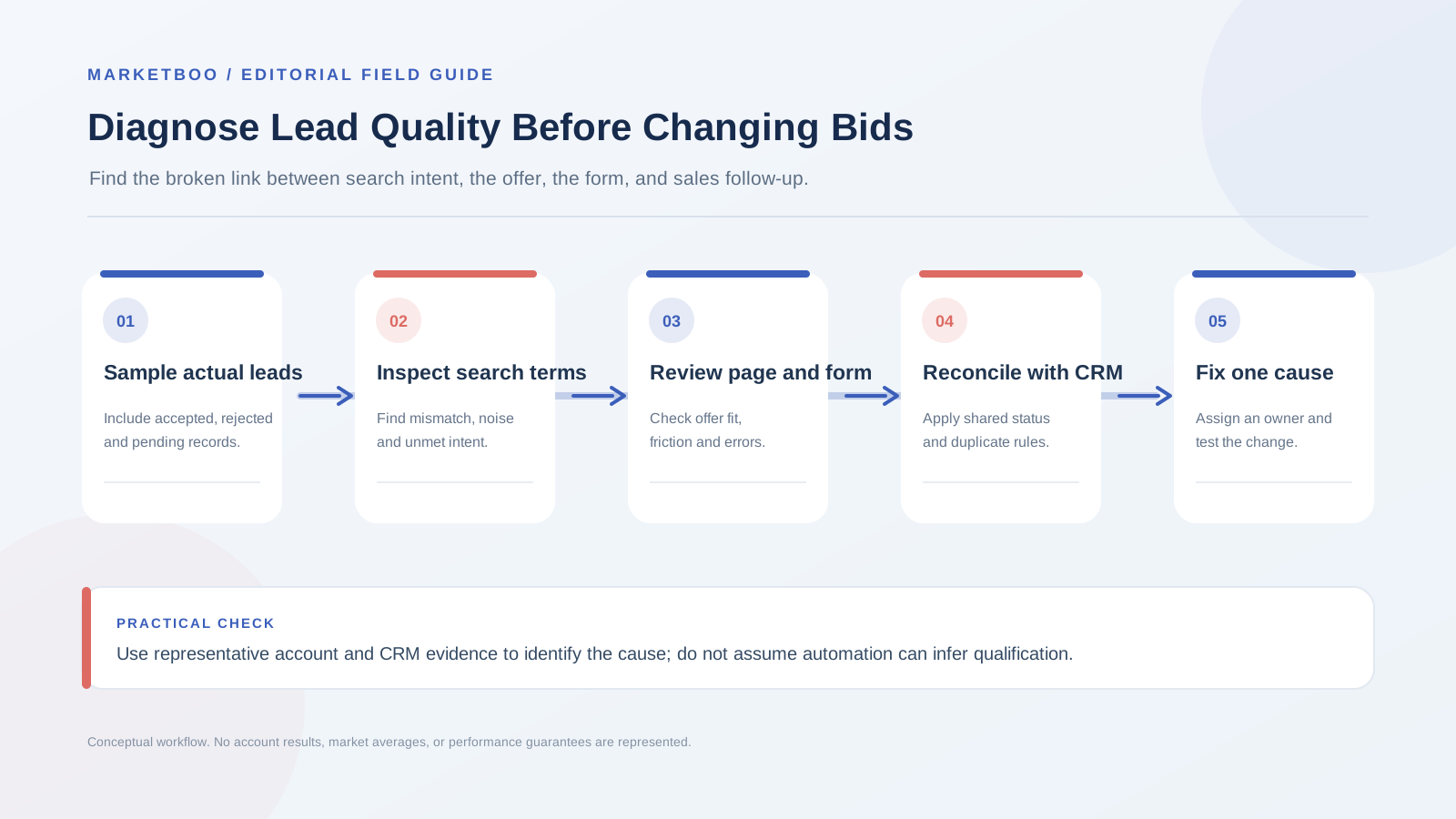
How to diagnose low quality leads from Google Ads
Use the sequence below as a short diagnostic sprint. The timing depends on account volume, sales response time, and how long the buying cycle takes.
- Collect a representative lead sample. Choose a recent period that includes enough inquiries to reveal repeated patterns. Include accepted, rejected, pending, duplicate, and no-response cases. Avoid selecting only the most frustrating examples. If the account has very low volume, say so and treat the initial result as directional.
- Agree on stages and rejection reasons. Meet with sales and operations to define the difference between a submission, qualified lead, sales acceptance, opportunity, and revenue. Choose a short list of rejection categories. Make “no response” its own status so it does not become a catch-all for irrelevant leads.
- Reconcile the sample across platforms. Match the website action, ad record, analytics event, and CRM row as far as the systems allow. Check for duplicates, missing source details, conflicting timestamps, and routing delays. Confirm whether each platform counts by click date, event date, or its own attribution rules.
- Map each inquiry to search, ad, and destination. For every available record, identify the campaign or query theme, the promise the user saw, the page visited, and the information submitted. Group the examples by repeated cause rather than by individual campaign name alone.
- Rank causes by evidence and business impact. Separate confirmed causes from plausible explanations. A broken form is a confirmed operational fault after a successful test reproduces it. “The keywords are too broad” is a hypothesis until the actual query pattern supports it. Prioritize fixes that prevent unserviceable demand or restore lost valid inquiries.
- Choose one primary change per test. Revise a query group, ad promise, page section, field, or routing rule with a clear reason. If multiple urgent fixes are necessary, document them separately and recognize that the results will not isolate which change drove the outcome.
- Test the complete path before spending resumes. Submit a test inquiry, confirm the correct event, verify the CRM record and owner, and check the follow-up message. Review on mobile. If offline conversions are part of the design, validate the import path in the account documentation and with the implementation owner before relying on imported outcomes.3
- Review the next sample with sales. Use the same statuses and review window. Compare accepted and rejected counts with the prior sample, but also examine why they changed. Do not scale or cut a campaign solely because a small set moves by a percentage; the absolute sample size and commercial context matter.
- Record the decision and the next checkpoint. Save the change, hypothesis, date, responsible owner, evidence, and restart condition. If the cause remains uncertain, specify what additional evidence would resolve it rather than making another broad campaign edit.
The process should create a reusable quality system, not just a one-time cleanup. Add a regular sales-feedback meeting or shared review queue. Give sales a simple way to select a reason and add a short note. Give marketing a way to connect that reason back to the campaign or query theme. If those links cannot be established, invest in consistent recordkeeping before expecting automated bidding to optimize for a status it cannot observe.
Improve the signal without chasing a vanity number
Once the stages are reliable, choose what signal should guide campaign decisions. A form completion may be appropriate for an early test if it is the only dependable event and volume is low, but keep it labeled as a form completion. If sales acceptance or a qualified opportunity can be returned accurately and at a useful cadence, those later stages may provide a closer connection to business value. There is no universal stage that every account should use.
Google Ads documentation supports conversion actions and offline-conversion workflows, including importing later events; implementation details and availability vary with the configuration.23 This does not mean that the system will automatically know whether a lead is good. Your organization must define the events, maintain the identifiers, transmit valid information, and monitor whether counts reconcile. Follow the applicable product instructions and have a qualified technical and privacy owner review the implementation. Bidding strategies respond to the goals and signals configured for the campaign, so verify that those inputs represent a useful business stage before expecting optimization to improve lead quality.7
Be cautious about optimizing for a very narrow outcome before there is enough reliable data. If only a handful of qualified opportunities occur over an extended period, changing the account to chase that event may leave the system with too little signal. A business might temporarily measure a more frequent but still meaningful action while keeping sales acceptance as the quality check. The choice should be explicit, reviewed as the data grows, and based on the team’s actual volume and sales cycle—not a generic threshold.
Likewise, do not treat an apparent decline in cost per lead as a win if the lead definition changed. If the form becomes easier and submissions increase, the result may be valuable if sales still accepts relevant buyers. It may be harmful if the new submissions are mostly outside scope. Report both quantity and quality stages, and preserve the denominator: for example, accepted inquiries out of reviewed inquiries, not accepted inquiries out of all form submissions when many have not yet been reviewed.
The dashboard should answer a decision, not merely display a collection of metrics. A weekly review might ask which query themes created accepted inquiries, which rejection reason repeated, whether sales made contact, and what should change. A monthly review might ask which campaigns progressed to quotes or opportunities and whether those deals can be connected to ad touchpoints. The reporting window should respect sales-cycle length and the delay between form and disposition.
If sales response time varies, include it in the diagnosis. A lead that receives a response after several days may be judged “unresponsive,” while the actual issue was a delayed follow-up. This is not a claim that faster response will fix every lead; it is a reason to record assignment time, first-contact time, and outcome. If the business cannot respond to new demand, more advertising may increase operational strain rather than improve growth.
When to bring in an outside reviewer
An independent review can help when marketing and sales disagree on definitions, when the account has accumulated years of overlapping campaigns, or when CRM and advertising reports cannot be reconciled. The review should trace a sample from query to sales disposition, identify which findings are observed versus inferred, and propose a test with an owner and measurement rule. Ask the reviewer to explain what cannot be concluded from the available data.
Marketboo supports international paid media and website work. If the problem may sit in the campaign, the page, or the lead handoff, review its global paid media service as a possible starting point. The useful next step is a documented diagnosis of the actual path, not a promise that one platform change will guarantee better leads.
FAQs about low-quality leads from Google Ads
Why am I getting clicks but few qualified leads?
The search may be broad, the offer may not match the query, the page may lack the information buyers need, or the form may fail. Check actual query themes, destination-page relevance, device behavior, and the submission path before increasing bids. The correct cause depends on evidence from the account and CRM.
Should I add more form fields to screen out bad leads?
Only when the team can explain how each field improves routing or qualification. Extra questions can reduce low-effort submissions but may also discourage legitimate buyers. Test the smallest set of useful fields and compare sales acceptance, completion, and follow-up effort.
Should I pause a campaign when sales rejects its leads?
Pause when a repeated, well-documented mismatch makes the traffic unserviceable or when tracking or the page is broken. If the evidence is thin, the rejection label is vague, or sales follow-up is incomplete, investigate first. Any pause should include a condition for restarting.
Can automated bidding fix lead quality?
Automation can use only the signals and goals configured for the account. It cannot infer your business’s qualification rules from a generic form submission. Define meaningful conversion actions and return later sales events only when the data flow is valid and reviewed.
How can I tell whether leads are duplicates?
Compare normalized contact details and CRM records using the company’s approved data process. Decide how to handle repeat submissions, existing customers, active opportunities, and multiple contacts from one account. Keep duplicate status separate from poor fit so campaign quality is not understated or overstated.
What if the platform and CRM report different lead totals?
Reconcile a fixed date range and inspect event firing, duplicate records, attribution windows, time zones, filtering, and import logic. The tools may count different things. Document the counting rule and use the CRM or agreed source of truth for the sales stage.
How often should we review lead quality?
Use a cadence that sales can maintain and that fits the campaign volume and buying cycle. Review new issues quickly when there is a clear fault, then compare consistent samples on a scheduled basis. Do not make major decisions from tiny samples without noting the uncertainty.
Conclusion: fix the earliest proven mismatch
Low quality leads from Google Ads are a symptom, not a diagnosis. Define the stages, review a representative sample, and trace each inquiry from search to sales handling. Fix the earliest confirmed mismatch first: irrelevant intent, unclear promise, weak page, poor form fit, broken tracking, or unreliable handoff. Keep a record of the hypothesis and measure the next sample using the same definitions.
That approach avoids two costly reactions: scaling a campaign because it generated more submissions, and shutting down a useful channel because sales used a vague rejection label. If your team needs help connecting the account, landing pages, and lead process, contact Marketboo for a Google Ads and lead-path assessment.