
Direct answer: LinkedIn Ads retargeting options can include website audiences and matched audiences built from eligible first-party sources or interactions, depending on current account access and platform rules. The practical choice depends on the signal, data source, audience readiness, customer stage, and message the team can deliver next. Before activation, confirm the current setup instructions, account eligibility, data permissions, audience status, and any size or processing requirements shown in the interface. Then define exclusions and a stopping condition. Do not treat a retargeting audience as proof of purchase intent or assume every option is available in every account.
A demand-generation team has several ways to follow up with people who encountered its brand. Someone visited a page. Someone submitted a lead form. Someone watched a video or engaged with content. Someone already exists in a customer or prospect list. The signal may be usable for advertising, but the next message should depend on what happened and what the company is allowed to do with that information.
This guide compares the options by source, prerequisites, and likely role in the journey. LinkedIn’s interface, eligible audience types, and minimum processing conditions can change, so verify the current account and official documentation before promising a setup. Static audience-size thresholds are intentionally avoided; use the current status shown for your specific audience.
Choose LinkedIn Ads retargeting options by signal
A website visit, an approved list, and a content interaction describe different relationships. Select the source only after the team understands its prerequisites, freshness, and intended follow-up.
Confirm available audience sources and conditions in LinkedIn’s current Marketing Solutions Help Center ; verify the specific current retargeting article in the help center before publication.
Website audiences: a visit is a signal, not a full profile
A website audience can support follow-up based on visits to pages or groups of pages when the account, tracking setup, and current product rules allow it. The useful question is which page behavior carries meaning. A visit to an implementation guide may suggest a different next step from a visit to a careers page or privacy statement. Define the URL or event rule, time window, exclusion, and owner before building the audience.
An audience setting is a current platform behavior, not a permanent promise. Record where it was verified, who checked it, and when the setup needs to be reviewed again.
Check the tracking source and confirm that it behaves as expected in the current account. A page view does not tell the advertiser why a person visited, whether the person is a decision maker, or whether they want another ad. Narrow the audience to a business-relevant journey and use a message that can help. Review the organization’s privacy notice and data-use obligations before activating tracking. Platform installation alone should not be described as universal consent or compliance.
Compare the audience options
| Option to investigate | Signal represented | Prerequisite to verify | Possible next step |
|---|---|---|---|
| Website audience | Eligible site visit or page group | Tracking, account access, privacy review, current status | Topic-specific explanation or comparison |
| Contact list | Approved first-party relationship | Data origin, permitted use, freshness, file rules | Relevant lifecycle or account message |
| Company list | Known organization set | Source validity, market fit, current audience support | Role-appropriate business content |
| Engagement audience | Interaction with eligible LinkedIn content or surface | Available source type and current conditions | Continue the content sequence |
| No retargeting | No suitable or approved signal | Audience relevance or readiness is insufficient | Improve prospecting or content first |
Choose the audience by the job it can do
Build a choice around the customer’s next decision. Website visitors can be useful when a page indicates a topic and the follow-up adds context. A contact list can support a known-account or lifecycle strategy if its use is approved. Engagement audiences may help continue a content sequence. None is automatically best. The right source depends on freshness, relevance, scale, data governance, and the sales process.
If the audience is small, overlapping, or slow to refresh, combining sources may improve reach but can weaken interpretation. Keep source membership visible where possible and avoid claiming that one audience drove a result when people qualified through several routes. Use exclusions to prevent a person from receiving acquisition messaging after a purchase, opt-out, or stage change when supported by policy and configuration. If the team cannot explain the audience’s business purpose, keep it out of the plan until it can.
Contact or company lists: governance comes first
Some campaign programs use first-party contact or company data to create matched audiences, subject to current platform capabilities, eligibility, and terms. Before preparing a file, confirm the data source, purpose, approved fields, file handling, access, and retention with the organization’s privacy and security owners. Use only the minimum data the approved workflow requires and follow the platform’s current instructions for formatting and upload.
List quality matters. A stale prospect file may include customers, former employees, duplicate records, or people who should not receive acquisition ads. Define how often the list is refreshed, who approves it, and what exclusion rules apply. A matched audience is not a complete representation of every contact in the source file; matching and delivery depend on the platform and audience conditions. Do not promise a specific match rate or size without observing the actual account status. Store the source and review date with the campaign record.
Engagement audiences: match the next message to the interaction
Depending on current options, a team may be able to create audiences based on engagement with LinkedIn content, lead forms, video, or other eligible surfaces. Each interaction signals something different. A completed form is not the same as a video view. A high-intent action can support a closer follow-up, while a brief interaction may call for broader education or no retargeting at all.
Document what qualifies someone for inclusion and how long that signal remains useful. Make the next creative consistent with the original interaction. A person who watched an explainer may want a deeper implementation guide; sending an unrelated product demo can break the conversation. Check whether the interface offers the exact source and conditions required. If it does not, do not approximate a capability from a blog post or another advertiser’s screenshot. Record the available setting as observed and verify again before the campaign goes live.
Audience size, processing, and changing thresholds
Retargeting systems often need enough eligible records or activity to process and serve an audience. The relevant status and minimums can vary by audience type, account, region, or current platform rules. Check the audience’s actual status in the live interface and consult current help documentation. Do not copy a numerical threshold from an old article and present it as a universal standard.
If an audience is unavailable or too small, diagnose the cause. The source may be inactive, tracking may be misconfigured, the time window may be too narrow, the data may not meet platform requirements, or the market may simply have few eligible people. Each diagnosis suggests a different response. Do not extend the window indefinitely or add unrelated sources solely to make a status turn green. A larger audience is not automatically a more relevant audience.
Design a sequence with exits
A retargeting plan should define not only who enters but also who leaves. For example, a guide reader might receive a deeper explainer, then exit after a consultation request or after the allowed window. A form submitter might move into a sales process and be excluded from prospecting ads. An existing customer might receive a separate product-education message if that is useful and approved.
Set frequency review and creative rotation as operating controls, not universal numeric rules. Examine delivery, audience overlap, feedback, customer questions, and the stage the message represents. If people repeatedly see an ad without a useful next action, stop the sequence or improve the destination. Record the owner who can pause the campaign and how quickly exclusion data is refreshed. A stopping condition is part of customer experience.
An activation checklist
| Before activation | Owner question | Record |
|---|---|---|
| Source | What action places a person in the audience? | URL, list, interaction, or event rule |
| Data governance | Is the source approved for this use? | Reviewer and review date |
| Freshness | How long does the signal remain meaningful? | Window and refresh process |
| Exclusions | Who should not receive acquisition messaging? | Purchase, lead, opt-out, or stage rule |
| Status | Is the audience eligible and available now? | Current in-account status and date |
| Exit | What ends the follow-up? | Stop condition and campaign owner |
Decision tree: which option should you investigate?
If the intended signal is a known website topic, start by checking whether a website audience is currently available and whether the tracking and notice requirements are satisfied. If the intended signal is a known relationship such as a prospect or customer, ask whether an approved contact or company list is appropriate and up to date. If the intended signal is content interaction, review the engagement audience options actually available in the account. In each case, define message, exclusions, and expiration.
If no source meets those conditions, the correct answer may be to use broader prospecting, improve the content path, or wait. Do not upload data or activate tracking just because a retargeting feature exists. The option should fit the audience and the organization’s governance. Keep a decision memo with the selected source, why alternatives were rejected, current documentation checked, and a revalidation date. That makes the plan explainable when the interface changes.
Measure audience value without confusing attribution
Use platform reporting to understand delivery under the account’s current definitions. Add analytics and CRM measures when they answer a separate business question. A person can qualify for an audience because of a prior interaction and later convert for reasons not caused by the retargeting ad. Platform-attributed conversions, site sessions, and sales records each have limits. Report the windows and definitions and avoid summing overlapping totals as unique people.
For a high-stakes budget decision, consider a suitable comparison design or holdout if the available audience and policy conditions allow it. If the sample is too small, say that incrementality remains uncertain. Track downstream lead quality, demo attendance, purchase, or retention only where the organization has agreed definitions. A small, relevant audience that teaches the team something may be more useful than a large retargeting pool with no clear action.
Website audiences need a page taxonomy
A site with hundreds of pages should not create a separate audience for every URL. Group pages by customer task: overview, pricing, implementation, product detail, help, careers, or customer account. Decide which groups represent a meaningful follow-up and which should be excluded. Maintain the taxonomy when the site changes. A renamed URL, new language folder, or migration can cause a rule to stop matching the intended pages. Test the audience definition after major releases and keep a record of the URLs in scope.
Lists need a lifecycle owner
A contact or company list becomes less reliable as people change roles, accounts close, and customers move into a different lifecycle stage. Set an owner for source updates and a retirement process for obsolete records. Decide how customer, prospect, partner, employee, and excluded records are handled. If separate lists overlap, document precedence and exclusion logic. Keep the original source system authoritative; an advertising upload should not become the only copy of a customer relationship. Confirm the approved transfer method and delete local working files according to internal policy.
Engagement is a ladder, not one event
A short video view, a full view, a lead form open, a form completion, and a page interaction indicate different levels of effort. If the current platform supports these sources, choose the one that best fits the next message. Do not treat every interaction as intent. A person may watch because a topic is interesting without being a buyer. A form completion may warrant a prompt follow-up but still require qualification. Use the event and its context to choose a relevant next step, not to assign a certainty the signal does not carry.
Overlap can make results look larger
One person may qualify through a website visit, a contact list, and an engagement audience. If campaigns target overlapping groups, reported reach, conversions, and costs can be difficult to interpret. Where the platform permits, design exclusions or campaign roles to reduce avoidable overlap. Otherwise document the limitation and avoid summing audience sizes as unique people. Review the journey across teams so a prospect does not receive several unrelated messages from different campaigns during the same period.
The setup should survive a platform change
Keep a practical migration note: audience name, business definition, source, rule, dates, exclusions, campaign use, owner, and current interface evidence. If the platform changes or an audience type is removed, this record helps the team select a suitable replacement or stop the activity. Do not build the process around a screenshot alone. Store the current official help page and last verification date, and check again before a new activation. Operational documentation should explain the customer logic even if the product labels change.
Maintain audience quality over time
Check each source after a site or CRM change
A new URL pattern, tag manager update, consent configuration, CRM field, or list-export process can alter audience membership. Add retargeting sources to the release checklist for relevant changes. Verify that the intended event continues to populate and that excluded pages remain excluded. If a source fails, pause the affected campaign or use an approved fallback; do not let a broken signal silently widen the audience.
Respect the difference between intent and identity
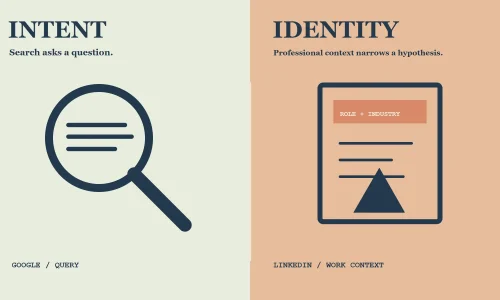
A page visit is behavior, while a contact list describes a record in a business system. Neither guarantees that the person is a buyer or wants another message. Use behavior to inform context and identity data only for an approved purpose. Keep creative language neutral enough not to reveal sensitive assumptions about a person’s activity. Ask privacy reviewers to consider the complete experience, not only whether a technical upload is accepted.
Create a refresh and expiration calendar
For each audience, name when its source data is refreshed, when the membership window expires, and who confirms the status. A calendar can catch a stale customer list or a URL rule that no longer matches the site. Add a review after major product launches and account changes. Retire audiences with no active campaign or clear owner. Expiration is part of data stewardship and of campaign quality.
Document unavailable options accurately
If an audience type is absent, rejected, too small, or still processing, save the current status and account context. Ask whether the issue is eligibility, setup, source volume, policy, or a temporary delay. Do not write customer-facing documentation that says the platform always supports a feature when the account cannot currently use it. Recheck official help and the actual account before advising another team. Platform documentation and observed status should be kept distinct.
Make the follow-up useful at each stage
An audience member may be early in research or close to a conversation. Create a small content map that connects the source interaction to the next useful resource, such as an implementation overview after a technical page visit or a demo invitation after a high-intent action. Avoid assuming the person remembers the first interaction. Keep the ad self-contained and honest. If the next step is simply another generic brand impression, reconsider whether the audience merits its own campaign.
Review eligibility before promising a launch date
An audience can take time to populate, fail a processing check, or remain unavailable because of its source or account conditions. Include verification in the launch schedule and do not promise a campaign date until the live account shows a usable status. If timing matters, prepare an alternative that does not depend on unverified audience availability. Report the observed status and date to stakeholders. This is an operational contingency, not a statement that every account will experience a delay.
Choose the audience by source, signal, and governance
A website audience, a lead-form interaction, and an approved contact source represent different kinds of evidence. For each option, note where the signal originates, what action it describes, how current it is, which team owns it, and what follow-up would be useful. A page visit may suggest a topic; it does not establish a person’s role or readiness. A contact list can offer a stronger business relationship signal, but it also requires a documented source and approved use. An engagement audience may show interaction with a campaign asset while leaving the underlying buying need uncertain. This comparison helps a team select the least assumptive signal that can support its next message. Confirm current platform eligibility before activation and set a refresh and exit rule. Assign an owner to verify website tags, list refreshes, and engagement-source definitions after each material change. The owner should know how to tell a valid audience from one that is unavailable or still processing in the account. Keep a record of the last review and next check date. A campaign plan should distinguish eligible to investigate from ready to activate, since source governance, audience delivery, and creative approval may have different owners and timelines.
Select and validate LinkedIn retargeting options
- Define the next customer decision and the business reason for retargeting.
- Select a candidate source: website activity, approved contact or company data, or eligible content engagement.
- Check the current LinkedIn account options and documentation for availability and processing conditions.
- Verify the source, data origin, freshness, permissions, and organizational privacy review.
- Define inclusion rules, recency window, customer stage, exclusions, and exit condition.
- Check actual audience status and overlap without assuming an old size threshold applies.
- Write a message and destination that continue the interaction the source represents.
- Confirm tracking, lead routing, account access, frequency review, and campaign pause ownership.
- Measure delivery separately from site, CRM, and commercial outcomes, stating attribution limits.
- Revalidate the audience and platform setup on a schedule and retire stale or unhelpful sources.
Operational mistakes with matched audiences

An old audience threshold is copied forward
Platform availability and processing requirements can change. Treat saved notes as a starting point, then verify the current in-account status and official documentation before promising a launch date.
A contact source has no accountable owner
Before a list is activated, identify who supplied it, why it may be used, how it is refreshed, and who handles deletion or correction requests under company policy.
A follow-up sequence has no end
Define what happens after a lead converts, a prospect becomes a customer, or the signal expires. A clear exit prevents a useful reminder from becoming irrelevant repetition.
A site change silently breaks the source
Cookie settings, tag changes, URL migrations, and consent flows can affect audience collection. Recheck the source after material site updates and record any period when the signal was incomplete.

Questions about LinkedIn audience options
What LinkedIn retargeting options are available?
Current options may include website or engagement-based audiences and matched audiences from eligible sources. Availability depends on the account and current platform rules.
What are LinkedIn Matched Audiences?
They are platform audience features for eligible sources or interactions. Verify current product definitions, requirements, and status in official documentation.
How large does my audience need to be?
Requirements can vary and change. Use the audience’s current in-account status rather than copying an old threshold.
Can I upload a customer list?
Only after confirming that the source and use are approved, data handling follows internal requirements, and the current platform terms permit the workflow.
How long should website visitors be retargeted?
Choose a window based on the customer cycle and signal relevance, then document a review and exit rule.
Should all website visitors receive the same ad?
No. Use page context and customer stage where possible, and avoid messaging that assumes intent the visit does not establish.
What if my audience is too small?
Check source activity, tracking, window, eligibility, and current processing status. Do not broaden the signal without a business reason.
A practical decision on LinkedIn Ads retargeting options
LinkedIn Ads retargeting options should be chosen by signal, eligibility, and the message that follows. The next step is to decide what the current evidence can support, assign the work to an owner, and record the conditions under which the decision should be revisited. An audience setting is a current platform behavior, not a permanent promise. Record where it was verified, who checked it, and when the setup needs to be reviewed again. Keep examples clearly labeled, platform statements tied to current official documentation, and uncertain claims out of any public promise. If the retargeting plan needs implementation or training support, review Marketboo’s hands-on advertising coaching. For an in-house team building a repeatable audience workflow, explore hands-on advertising coaching. These service links describe possible scope discussions; they do not guarantee a performance outcome.