

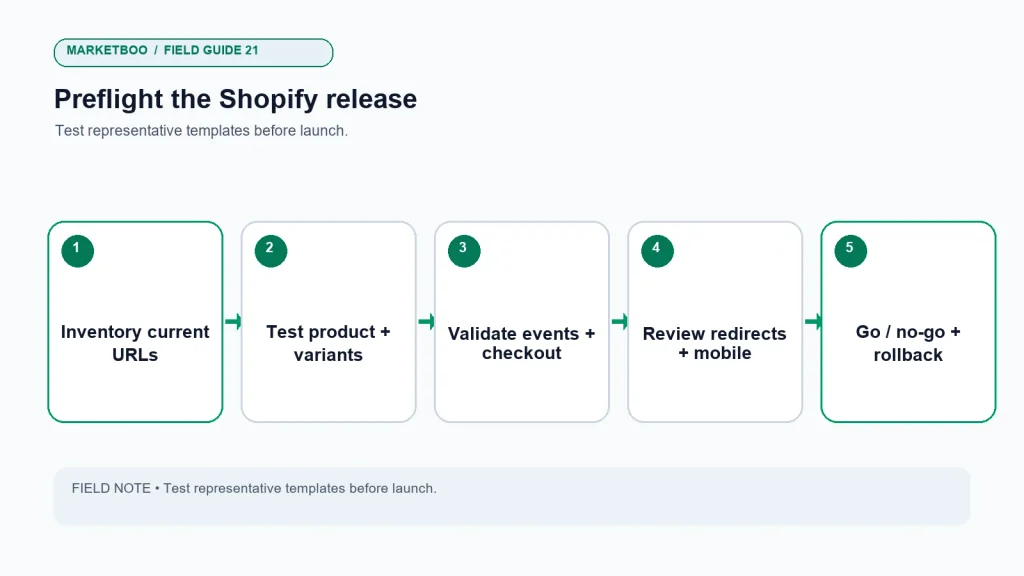
The short answer: A Shopify store redesign checklist should verify the customer path, search continuity, and measurement before the new theme or storefront goes live. Inventory important URLs and products, confirm which changes affect handles or templates, test redirects, review canonical and indexation behavior, validate product and collection data, and run test orders through the approved checkout path. Check mobile navigation, accessibility, performance, analytics events, and app dependencies in a production-like environment. Keep a launch owner, rollback plan, and post-launch monitoring window. A theme change does not automatically require every technical setting to be rewritten; test the actual store and document what changed.
Start the Shopify store redesign checklist before changing themes
The new storefront can look finished while a collection link is broken, a discount behaves differently, a customer event fires twice, or a product URL redirects to an unrelated page. These failures are difficult to catch if the team treats launch as a design approval instead of a release.
This checklist is specific to Shopify stores, but the right checks depend on the store’s theme, apps, checkout configuration, markets, custom code, and integrations. Shopify’s official online store and theme documentation and URL redirect guidance should be checked for the current platform behavior before changes are made. Do not assume a feature works identically across every store or plan.
Set up the preflight workspace
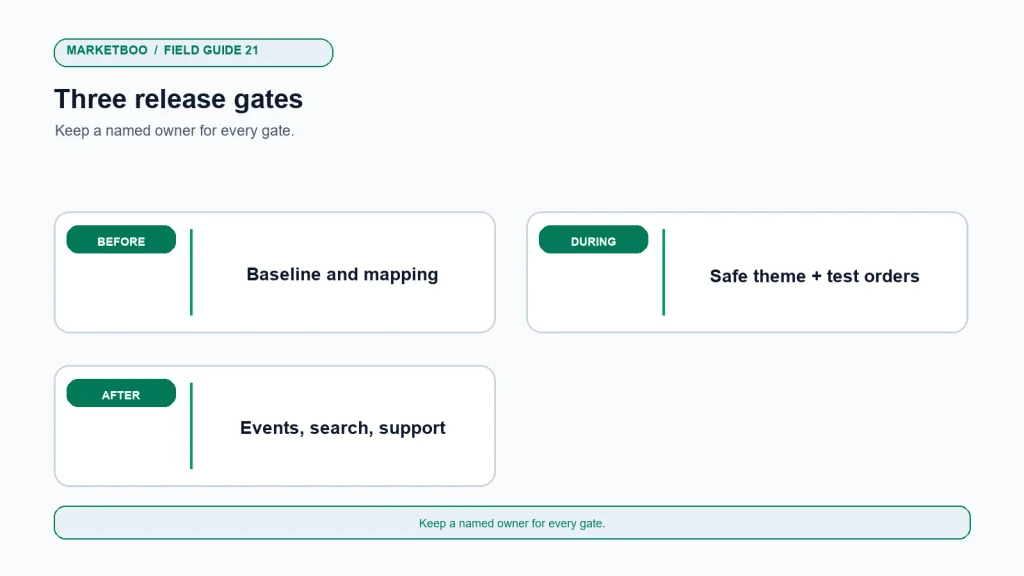
Assign a release owner who can coordinate the business and technical checks. Create a test inventory with page type, URL, device, test account or order reference, expected result, actual result, severity, owner, and status. Include an approver who can call go, defer, or rollback. Keep a copy of current theme settings, app list, key page URLs, redirect rules, analytics configuration, and consent setup according to company policy.
Use a safe theme preview or staging method that mirrors the live environment as closely as practical. Protect non-public environments from unintended indexing and customer access. Avoid placing real customer or payment information in a test environment unless it is specifically approved. Confirm that the team can return to the prior theme or release if critical defects appear.
| Preflight detail | Owner | Evidence to save |
|---|---|---|
| Release decision | Ecommerce or project owner | Go/no-go checklist and decision time |
| Theme and code changes | Developer | Theme version, commit or change record, app dependencies |
| URL migration | SEO/content owner | Old-to-new URL map and redirect test results |
| Products and collections | Merchandising owner | Product samples, variant and availability checks |
| Events and analytics | Measurement owner | Test event log and expected event map |
| Checkout and orders | Ecommerce operations | Test order, confirmation, fulfillment/refund test path |
| Recovery | Technical/release owner | Previous theme reference and rollback steps |
Inventory the existing store before the theme changes
Export or crawl the store’s important URLs. Include homepage, collections, products, pages, blog articles, policies, contact routes, campaign landing pages, localized paths, and any app-generated content the business relies on. Compare this list with analytics, Search Console, sales team links, and external references where available. Do not limit the inventory to navigation; many useful URLs are linked from email, ads, or search results rather than the menu.
For each URL, record the current page type, value or purpose, owner, proposed new URL, action, and redirect destination. Keep product and collection handles stable where possible if there is no reason to change them. A redesign does not benefit from URL changes made solely for cosmetic consistency when the current paths work. If a URL must change, map it to the closest relevant destination and test the redirect.
| Old URL/page | Keep, update, merge, or retire | Proposed destination | Redirect tested? | Content or owner dependency |
|---|---|---|---|---|
| Priority product page | ||||
| Important collection page | ||||
| High-value campaign page | ||||
| Blog/resource page | ||||
| Store policy or contact page |
The table should be filled from the actual store, not copied as a static checklist. A product page with an old handle may still receive customer or search traffic. A retired campaign page may need a message explaining the offer ended rather than a generic homepage redirect. Document exceptions so future editors understand why the mapping exists.
Product, variant, and collection checks
Pick representative products across the catalog. Include products with multiple variants, discounted pricing, subscriptions or bundles if used, backorder or out-of-stock states, and special shipping conditions. Verify title, image, variant selector, price, compare-at price where appropriate, availability, product description, and call to action. Test the storefront behavior on mobile and desktop.
Check collection rules and manual sorting. Confirm that a product appears in the intended collection, category links work, filters return sensible results, and pagination or infinite scrolling does not hide important items. If the theme changes product card markup or filter behavior, check how screen readers and keyboard users experience it. If collection descriptions or content blocks move, confirm the page still explains the category and supports the shopper’s decision.
Review merchandising rules with the product owner. A theme may present badges or promotional messages differently. Confirm that “sale,” “new,” “low stock,” shipping, warranty, and product compatibility claims are accurate and generated from the intended data. Do not let visual design introduce a statement that the product or operations team has not approved.
Search continuity: URLs, redirects, and page signals
Before launch, compare important metadata and page content against the baseline. Review title tags, descriptions, H1 headings, canonical references, indexation controls, structured data, internal links, image alt text, and sitemap behavior on representative templates. Confirm that staging protection will not leak into the live site and that live pages are not accidentally blocked after release.
Shopify typically manages some platform behaviors, but the exact outcome can depend on store configuration, theme, apps, and customizations. Verify the actual rendered page. Avoid adding canonical tags or structured data blindly if the theme or app already provides them. Duplicate markup can create ambiguity, and a developer should understand the existing output before changing it.
Test each redirect in the approved mapping. Check the response and final destination, not just whether the browser eventually shows a page. Avoid redirect chains and unrelated destinations. When multiple old URLs point to the same new page, verify that the new page actually satisfies the visitor’s likely intent. Store the tested map so it can be used in the launch report.
Tracking, pixels, and customer events
Theme or app changes can affect analytics and advertising events. Map the customer actions that matter: product view, add to cart, checkout start, purchase, refund, and other store-specific events. Note the event source, trigger, owner, and expected destination. Do not create a new pixel or duplicate integration simply because a dashboard looks quiet before launch.
Shopify documents pixels and customer events and its current integrations in the help center. Use a controlled test with a test order or safe checkout route, and check the event in each relevant system. Confirm whether the event is sent once, whether product and value parameters are sensible, and whether the final order state is represented correctly. If the store uses a consent mechanism, test behavior under the appropriate consent choices and ask the privacy owner to approve the implementation.
| Event or path | Expected action | System to check | Test evidence |
|---|---|---|---|
| Product view | Eligible product page is viewed | Store analytics and connected platform | Product ID and page URL recorded |
| Add to cart | Chosen variant is added | Cart and analytics event source | Correct variant and quantity |
| Checkout start | Shopper enters checkout | Checkout and analytics | Event appears under approved settings |
| Purchase | Test order completes | Shopify and ad/analytics destinations | Order reference and event timestamp |
| Cancellation/refund | Test reversal is recorded when applicable | Store and reporting systems | Net outcome not mistaken for retained sale |
| Form inquiry | Lead form routes as intended | CRM and notifications | Test record, owner, and disposition |
The test record should use non-customer data and be removed or labeled according to policy. If event totals differ, note the definitions and investigate before launch. Do not use a real customer’s purchase as a test without authorization.
Mobile, accessibility, and page experience
Use actual tasks to review the new theme on small screens. Can a person find the main category, choose a variant, read the product information, understand shipping and return terms, and reach the checkout? Are buttons large enough to use, overlays dismissible, and text readable at normal zoom? Do images shift the layout while loading? Does a menu trap or hide keyboard focus?
Check representative page types rather than only the homepage. Product detail, collection, cart, search results, article, and contact pages can behave differently. Review content at common viewport widths and with keyboard navigation. If the business has users who need assistive technologies, include those users or a qualified accessibility reviewer where possible. Automated checks can identify some issues but do not establish that the full experience is accessible.
Measure performance using both field and lab evidence when available. A single test on a developer’s fast connection cannot represent every shopper. Record the page, device and network conditions, tool, date, and template. Prioritize the largest practical bottleneck rather than optimizing a score in isolation. Large images, third-party scripts, app widgets, and custom code can all affect performance; test changes to see whether they help and do not remove a business-critical feature without owner approval.
Checkout and operational reality
Place test orders through the relevant routes: a full-price item, a discount, a product with variants, and a shipping or pickup option if applicable. Check confirmation, customer email, order record, tax or shipping behavior as configured, fulfillment handoff, inventory update, refund or cancellation route, and any subscription or gift-card flow the store uses. Use a safe test mode or approved internal procedure; do not trigger real charges or customer communications unintentionally.
Confirm checkout settings and content with the owner. A theme redesign may not change checkout, but navigation, cart behavior, app extensions, and scripts can change the path leading into it. Test the complete customer journey from ad or search landing page to order confirmation, not only a single button.
Check app dependencies and content ownership
Create an app and integration inventory before launch. List the business purpose, pages or actions where each app appears, owner, permissions, data sent, theme embed or extension, billing responsibility, and fallback if it stops working. Include review widgets, subscriptions, bundles, search, personalization, chat, shipping estimates, loyalty, analytics, consent, and email capture where used. An app can be essential to a customer promise even if it adds code or maintenance.
During the theme change, confirm whether each app is installed once, whether its embed is enabled on the intended template, and whether the app’s settings or styling need to be reconfigured. Avoid removing an app because it is invisible in the preview; it may appear only for certain customers, markets, or page states. Ask the owner to approve functionality and data impacts.
Content ownership matters just as much. Decide who updates product text, policy pages, blog articles, alt text, collection descriptions, and promotional messages after the new theme is live. If only a developer can edit routine content, the design may increase ongoing operating costs. Test the content editor’s workflow in the new theme before launch, especially for product variants and market-specific details.
| Dependency | Launch check | Owner |
|---|---|---|
| Reviews or ratings | Widget loads, accessible, and assigned to the correct products | Ecommerce/product owner |
| Search and filters | Results, facets, empty states, and mobile behavior work | Merchandising/web owner |
| Subscriptions or bundles | Product selection and order record retain expected options | Operations owner |
| Analytics and advertising | Events are not duplicated and destinations are correct | Measurement owner |
| Consent and privacy | Behavior matches the approved configuration | Privacy/technical owner |
| Product content | Editor can update details without breaking templates | Content owner |
Go/no-go rules and rollback plan
Test the release with people who were not in the build
The project team knows where every button is and what each label means. A customer does not. Before launch, ask someone outside the immediate design and development group to complete a few realistic tasks without coaching: find a product, choose the right variant, understand shipping, use a discount, locate return terms, or contact the business. Observe where the person hesitates and whether the page supplies enough context. This is not a statistically representative usability study; it is a practical way to catch obvious gaps.
Include accessibility checks in the same review. Navigate the main path with a keyboard, inspect focus order and visible focus, confirm that dialogs can be dismissed, check text contrast, and verify that product images have useful alternative text. Test captions and controls for video. Automated tools can identify some code issues, but they do not replace a complete user task or qualified review.
Ask the reviewer to narrate what they expect before each action. A shopper may not know that a small swatch changes the selected variant, or that a thumbnail opens a gallery. This reveals whether the interface communicates its controls rather than merely responding when clicked. Record the wording or visual cue that caused confusion, then test the revision with another person when feasible.
Make sure reviewers understand the build under test and the limits of the exercise. Use a preview URL or approved staging method, and do not expose unpublished offers or customer data. Ask reviewers to note the device, browser, task, and page. If a participant encounters a blocker, assign it to an owner and retest after the correction. Do not dismiss a problem because the developer can work around it.
A task-based usability note
| Task | What to observe | Issue severity | Owner and retest |
|---|---|---|---|
| Find a specific product | Navigation labels, search, category hierarchy | ||
| Select a variant | Availability, sizing, images, price clarity | ||
| Understand delivery | Shipping terms, location rules, estimated date | ||
| Apply an offer | Code field, validation, price update | ||
| Complete checkout | Focus order, errors, payment and confirmation |
Before launch, classify issues as blockers, launch risks accepted by an owner, or post-launch fixes. A broken purchase path, incorrect price, unusable product selector, critical event failure, accidental indexing block, or invalid redirect for a key URL may be a blocker. The release owner and relevant business stakeholders should define what counts as critical for this store.
The rollback plan should state who can revert the theme or code, what data might change during the release, how orders will be handled, and how customers or internal teams will be notified. Preserve the version and settings needed to recover. A rollback plan that depends on an absent developer or an inaccessible account is not a working plan.
| Gate | Required evidence | Decision owner | Result |
|---|---|---|---|
| Content and product accuracy | Approved product and offer sample | Merchandising/product | Pass / hold |
| Search migration | Redirect map and key URL tests | SEO/release owner | Pass / hold |
| Store functionality | Product, cart, checkout, and form tests | Ecommerce operations | Pass / hold |
| Measurement | Event map and test evidence | Analytics owner | Pass / hold |
| Mobile/accessibility | Task checks and defects assigned | UX/accessibility owner | Pass / hold |
| Recovery | Tested or reviewed rollback method | Technical release owner | Pass / hold |
After launch: compare, don’t assume
Recheck critical pages and events immediately after release, then review at an agreed interval. Crawl the new site, inspect priority redirects, check analytics and CRM entries, validate products and offers, and listen for support issues. Compare against the baseline using matching time ranges and definitions. Seasonal change, campaigns, inventory, and other releases can affect results, so do not attribute every movement to the theme.
Keep a short launch log: release time, changes, tests, defects, owners, decisions, and follow-up. If a critical path breaks, use the agreed recovery process and document the effect. If search or revenue metrics move, investigate technical, merchandising, and market factors before making a broad claim about the redesign.
Set a clear support route for the first days after launch. Customer service should know where to send checkout, product, or account issues. The developer should know who can approve an urgent correction. Marketing should know which ads or emails need to be paused if a landing page is unavailable. Keep these contacts available during the release window and document when the team returns to normal support coverage.
Review analytics events against a pre-launch baseline, but expect test orders and deployment changes to create noise. Mark internal or test activity so it is not mistaken for customer demand. If the event schema changes, record the date and update the reporting notes before comparing conversion rates across versions.
How to use the Shopify redesign checklist
- Name the release owner and approver. Record who can call go, defer, or rollback and who handles urgent fixes.
- Capture the current baseline. Save key URLs, theme state, apps, events, forms, and search/analytics evidence.
- Inventory products and pages. Sample product variants, collections, articles, policies, and high-value landing pages.
- Map URL changes. Keep working handles when possible; assign relevant destinations to every changed or retired URL.
- Review page-level search signals. Check titles, headings, canonicals, structured data, indexation, internal links, and sitemap behavior.
- Test mobile customer tasks. Navigate, search, select a variant, add to cart, review policies, and enter checkout.
- Verify analytics and pixels. Use controlled test actions, check event payloads and duplication, and confirm consent behavior with the owner.
- Run operational test orders. Validate order, inventory, notification, fulfillment, cancellation, and refund paths using approved procedures.
- Resolve blockers and test recovery. Assign severity and owner; confirm rollback is possible before the release.
- Monitor after launch. Recheck priority URLs, events, sales paths, search signals, and support reports; document fixes and interpretation.
When a Shopify redesign needs an outside reviewer
An outside reviewer can be useful when the project spans theme development, custom code, SEO migration, paid-media tracking, or store integrations the internal team cannot validate. Ask for a specific QA scope: which templates and URLs will be checked, which devices or test paths are included, what evidence will be delivered, and who will fix any issues found.
Marketboo offers website development and design and SEO/GEO services. If you need help with launch planning, contact Marketboo with the store platform details, theme changes, priority URLs, integrations, and launch date. Confirm scope and responsibilities in writing; an audit does not replace the store owner’s release decision.
FAQ
What is the most important item on a Shopify store redesign checklist?
There is no single item for every store. Protect the purchase path, current product information, important URLs, analytics, and rollback capability. Prioritize the checks that would prevent a customer from buying or the team from detecting a serious issue.
Do Shopify URLs change when I redesign a theme?
A theme change alone does not necessarily require product or collection URLs to change. URL handles can be edited separately. Inventory paths before the project, preserve useful URLs where possible, and set relevant redirects when a path must change. Verify current Shopify behavior for your store configuration.
Do I need to change analytics or pixels during a redesign?
Not automatically. First document existing event sources and test them. Change tracking only when the implementation requires it, and avoid adding duplicate tags. Verify a test action in each relevant system and involve the analytics and privacy owners.
How do I test a Shopify checkout safely?
Use Shopify’s current test mode or an approved internal procedure and avoid real charges or customer notifications. Verify the product, variant, price, discount, shipping, order record, inventory, confirmation, fulfillment, and reversal path that matters to your store.
What should I do with discontinued product pages?
Review inventory, customer need, search and referral traffic, and whether a successor product exists. Keep the page with clear availability information, redirect it to a genuinely relevant replacement, or retire it with a useful destination. Do not automatically send every discontinued product to the homepage.
What should block a Shopify store launch?
The business should define blockers based on its store, but common candidates include an unusable product or checkout path, incorrect prices or offers, critical redirect failures, accidental indexation blocking, broken required integrations, or a rollback plan that does not work. Assign a decision owner for accepted risks.
How long should post-launch monitoring last?
Choose a period that fits the store’s traffic, sales cycle, campaign calendar, and risk. Check critical paths immediately and continue monitoring long enough to identify issues in key templates. There is no universal number of days; record the owner and review schedule before launch.
Ship only when the customer path is testable
A Shopify store redesign checklist is most valuable when it makes the release decision evidence-based. Test the full path from product discovery to paid order, preserve useful URLs, map events, and keep recovery in reach. A redesign can improve the experience, but the team should verify outcomes rather than assume that a fresh theme has fixed every issue.
The release owner should be able to point to the baseline, redirect map, test orders, event checks, approval record, and rollback steps. If a critical item remains uncertain, assign an owner and decide whether to defer or accept the risk. After launch, compare like with like and use real evidence to guide the next improvement.