
The short answer: Meta Ads for Shopify stores work best when product data, advertising creative, and purchase measurement are treated as one operating system. First confirm that the products shown in ads match the live Shopify catalog. Then verify that the events used for optimization represent the intended customer actions and that a test order appears in both the store and the reporting stack. Build campaigns around product groups and distinct customer questions, not a single undifferentiated catalog. Finally, compare ad-platform results with Shopify orders, cancellations, returns, and contribution margin. This does not eliminate attribution differences; it gives the team a more dependable basis for deciding what to test next.
How Meta Ads for Shopify stores connect catalog and measurement
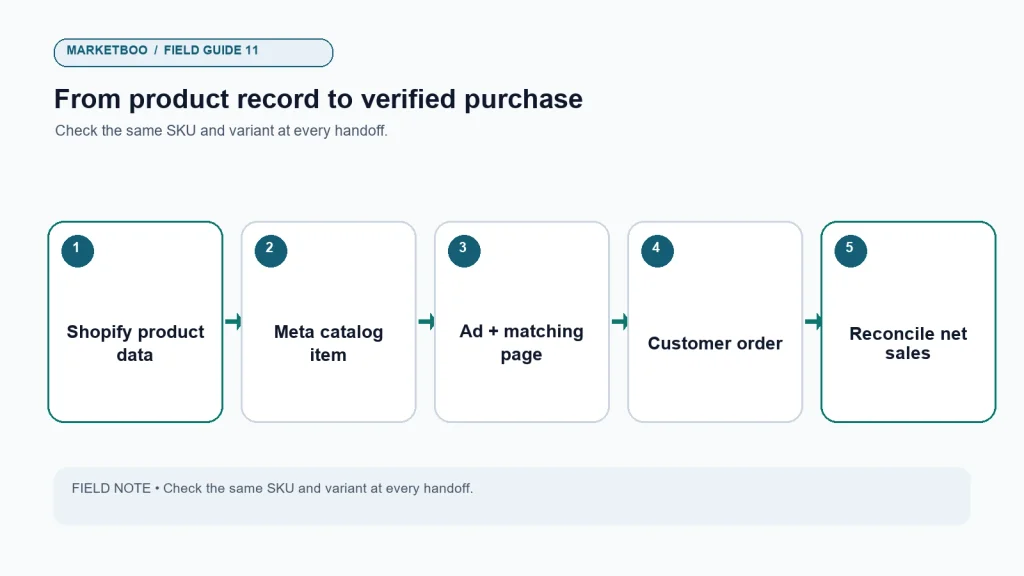
For this guide, a connected campaign has four pieces that agree: the product record in Shopify, the catalog item available to Meta, the creative and destination a shopper sees, and the purchase event used to evaluate the visit. “Catalog advertising” means ads that can use product information such as images, names, prices, and destination URLs from a product feed. A “purchase event” is a recorded action intended to represent a completed order. “Retargeting” or “remarketing” describes advertising to people who previously interacted with a business, subject to platform settings, consent requirements, and the audience options currently available in the account.
Those definitions sound technical, but the business question is simple: when a person clicks an ad for a particular product, can the team trace a plausible path from the ad to a current product page, to an order, and then to the money the business keeps? If not, a strong-looking dashboard may be measuring attention rather than usable growth.
Shopify’s official documentation for the Facebook and Instagram by Meta sales channel describes the platform connection and its setup requirements. Meta’s Business Tools terms and business help documentation govern the advertising tools and data connections. Interfaces and eligibility rules change, so treat the account’s current prompts as the operational source of truth and recheck the linked product documentation before making a production change.
Start with the store’s commercial truth
Before opening Ads Manager, decide what counts as a good customer for this store. The answer is rarely “anyone who buys anything.” A first-order discount can raise order count while leaving little contribution after product cost, fulfillment, payment fees, and expected returns. A catalog may contain a hero product, low-margin accessories, seasonal stock, and items that should not be advertised because inventory is limited. One campaign objective cannot resolve those differences for you.
Write down the commercial rules that should govern media decisions. Use the same currency and time period throughout. If gross margin differs by product family, record it by family. If refunds are common in one category, separate that category. If the business has a long delivery window, do not judge a new campaign before enough orders have had time to mature. These are operating decisions, not platform settings.
| Store question | Record before launch | Why it matters |
|---|---|---|
| Which products can be advertised? | Active, in-stock, shippable products and excluded items | Prevents ads from sending shoppers to unavailable or unsuitable products. |
| What is the business optimizing for? | A completed purchase, qualified lead, or another defined outcome | Keeps the campaign objective connected to the actual commercial goal. |
| What margin is available? | Contribution after variable costs, by product group when possible | A revenue-only return can overstate the value of low-margin orders. |
| What is the expected delay? | Typical time between click, order, shipment, return, and final settlement | Avoids comparing immature campaign data with finalized store economics. |
| Who owns reconciliation? | Named store, media, and analytics owners | Makes discrepancies actionable instead of a recurring argument. |
This small preflight prevents a common category error: treating the advertising platform’s attributed revenue as the store’s audited sales figure. Ads Manager is designed to report activity under its own rules and attribution settings. Shopify records orders according to its own event and order logic. Analytics tools may use another model. The goal is not to force every system to show the same number. The goal is to know what each number means, use it consistently, and investigate material changes.
Audit the connection in the order a shopper experiences it
The useful order is not “campaign, then check tracking if results look strange.” It is product, destination, event, then campaign. A mismatch at the beginning can contaminate every later decision.
1. Match the advertised product to the live listing
Pick a small sample of products from the intended catalog set. Check the product identifier, title, variant, image, price, availability, and URL in Shopify against what is available in the connected catalog. Include at least one product with variants, one on-sale item, and one product that is temporarily unavailable if those cases exist in the store. Open the destination as a shopper would, including on a phone. Check whether the product page shows the same variant and price promised in the ad.
A mismatch is not merely a feed-cleanup task. It changes the customer’s experience. If an ad presents a discounted variant but opens the default variant at a different price, the person may leave before checkout. If the picture shows a bundle but the page offers a single item, the click has not solved the shopper’s problem. Keep a short log with the product ID, expected state, observed state, owner, and correction date.
2. Confirm the event path with a controlled test
Use the store’s permitted testing tools and a low-risk test order or sandbox flow where available. Record what action you took, the time, the order or test reference, and which systems received the event. Check whether the event represents the action you think it does. A button press, checkout start, payment attempt, order confirmation, refund, and cancellation are different moments. Do not label them all “purchase.”
Shopify documents customer events and pixels in its custom pixels and customer events guidance. Meta explains event setup and the Meta Pixel in its own business documentation. Exact menus and integration options can change. Revisit the current instructions and inspect the actual implementation rather than relying on a setup screenshot from a previous theme or a different store.
If the implementation uses more than one event path, compare the paths carefully. A browser pixel and a server-side integration can both be legitimate parts of a measurement setup, but duplicate or inconsistently deduplicated events can distort reported totals. The correct question is not “Do I see two events?” It is “Does the documented setup identify and reconcile the same customer action without counting it twice?” Do not add tags or custom code to solve a problem until the owner knows how the existing integration is designed.
3. Test the destination, not just the ad preview
Previewing a creative checks how an ad may appear in a placement. It does not prove that every link, mobile layout, localization, discount code, or checkout step behaves correctly. Use a link test sheet. For every ad variant, record the final destination URL, any tracking parameters, product or collection, audience context, and the intended next action. Test the actual link after publishing with the smallest safe delivery setting available to the account.
Avoid changing a live destination simply because an ad is underperforming. First establish whether the issue is the audience, offer, product page, inventory, or measurement. If a test changes all of these at once, a result cannot tell you which change mattered.
Organize the catalog around shopper decisions
A product catalog is a structured source of merchandise information, not a campaign strategy by itself. Begin with a simple segmentation question: which products should be presented together because they serve the same buyer, solve the same need, or require the same proof? A category that looks tidy in the store’s navigation may be unhelpful in an ad if it combines products with different price points and purchase objections.
Use product groups that a person on the marketing team can explain in one sentence. “New arrivals that share a use case” is clearer than “everything with an active product status.” “Replacement parts for model family X” is clearer than “all accessories.” Keep the product set small enough that the team can see when an item is unavailable, a price changes, or a seasonal offer ends.
| Grouping approach | Useful when | Watch for |
|---|---|---|
| Product family | Products share a use case and similar purchase questions | Large families can hide different price tiers or margins. |
| Margin or business priority | The team needs to protect economics or prioritize inventory | Exclusions and segmentation must stay current as costs change. |
| Lifecycle or season | Availability and timing matter to the offer | A calendar label alone does not prove current stock or eligibility. |
| New versus returning shopper | The creative or message differs by familiarity | Audience eligibility, consent, and platform rules must be respected. |
| Best-supported products | The team has clear product information and service capacity | Do not equate historical sales with future demand. |
The choice of grouping should follow the business question. If the question is “Which product families can acquire first-time buyers profitably?”, group and report around product families and new-customer status. If the question is “Which products can we ship before a seasonal cutoff?”, inventory and delivery constraints matter more than a broad category name. Avoid creating so many groups that each has too little spend or too few observed outcomes to support a useful decision.
Make creative answer a real buying question
Creative is not only a visual asset. It is the reason someone pauses, the expectation the click creates, and the evidence the product page must continue. For each test, write a sentence that identifies the shopper, their question, and the product proof. For example: “A first-time buyer who is unsure about sizing should see the fit guide before the discount.” That is testable. “Make it more engaging” is not.
Plan a mix of messages that answer different questions, such as what the product does, how it compares with an alternative, what is included, who it is for, how it is used, and what happens after purchase. Do not change the offer, audience, landing page, and central message all at once when the goal is to learn which message works. A test with one interpretable difference is easier to act on.
Keep creative naming readable. A useful label can include the product group, message, format, version, and date. “Core kit | size reassurance | vertical video | v2 | Oct 26” gives a reviewer more context than “final-new2.” Store the source file and final export together with the approved claim or offer. If the product page has changed, review the ad before reusing it.
For a small team, a short weekly review is more valuable than a large asset list with no learning record. Mark each creative as keep running, revise, retest under a clearer condition, or pause. Include the reason and the next action. A creative can have a high click-through rate and still fail if it attracts people who do not complete a purchase. It can also have a lower click rate but assist a more relevant audience. Use the business outcome to judge the role of the creative.
Read results in layers instead of chasing one dashboard number
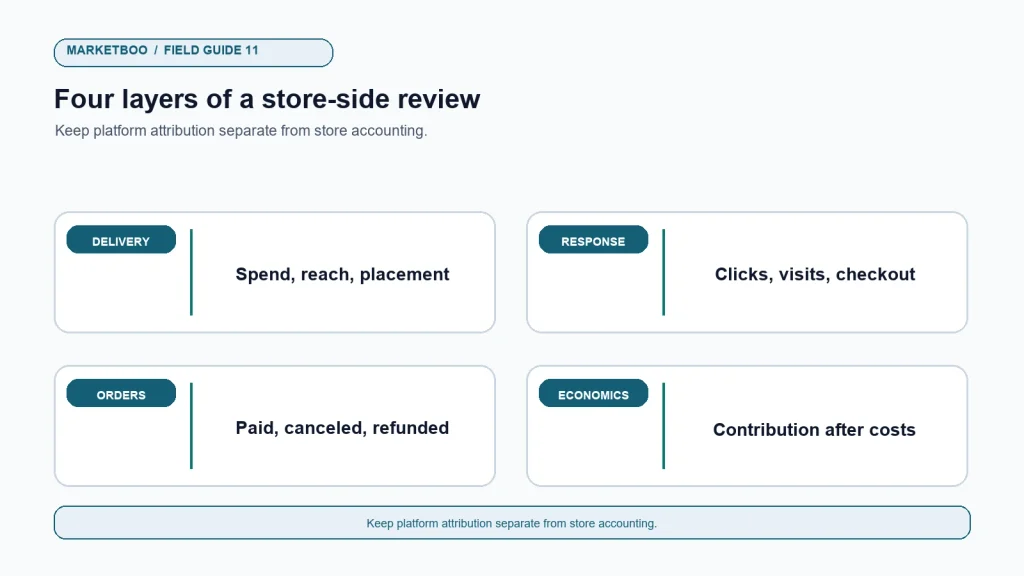
The first layer is delivery: spend, impressions, reach, frequency, and whether the campaign is running as intended. The second is response: outbound clicks, landing-page visits, product views, and checkout starts. The third is store outcome: orders, revenue, discounts, refunds, cancellations, and new versus returning customers. The fourth is economics: contribution after variable costs and the cost of acquiring an order or customer under a clearly defined model.
Do not compare metrics whose denominators differ. Cost per click is spend divided by clicks. Cost per order is spend divided by orders under a specified source or attribution rule. Return on ad spend is revenue attributed to advertising divided by advertising spend, but it does not subtract product costs, fulfillment, or returns. Contribution return would need a defined contribution numerator. A phrase like “profitable ROAS” is meaningless until the business states what costs are included and how the outcome is attributed.
A transparent illustrative reconciliation
Assume a store’s ad platform reports 40 attributed orders and $4,800 in attributed revenue for a week. Shopify records 36 paid orders associated with the same general period and $4,250 in gross sales after discounts. Later, two orders are canceled and three are refunded in part. This is a hypothetical example, not a benchmark or a claim about any Marketboo customer.
The platform’s reported return on ad spend at $1,200 in spend would be $4,800 ÷ $1,200 = 4.0. Using the store’s initial gross sales, the simple ratio would be $4,250 ÷ $1,200 = 3.54. If $300 of the $4,250 is later refunded or canceled, the revenue numerator becomes $3,950 and the simple ratio becomes 3.29. None of these ratios is automatically “the truth”; they answer different questions. The platform number reflects its attribution rules. The store number reflects orders recorded in the commerce system. The later adjusted number better represents collected revenue after the stated reversals, but still omits variable costs.
The next step is to reconcile the period, currency, order status, discount handling, tax treatment, shipping, refund timing, and attribution window. Where user-level matching is unavailable or inappropriate, do not imply that the team can connect every order to a single ad. Cohort, campaign, or aggregate analysis may be more responsible. Keep the limitations beside the chart rather than hiding them in a footnote.
Build a weekly test-and-reconciliation rhythm
An operating rhythm makes measurement trustworthy because the same definitions and checks are applied repeatedly. At the beginning of the week, confirm product eligibility, stock, offers, destination pages, and any recent theme or tracking changes. During the week, monitor delivery and obvious failures without rewriting the campaign every few hours. At the review, compare platform and store records for the same date range and note what remains immature. At the end, decide what to keep, what to investigate, and what single learning question the next test should answer.
The review need not become a large report. A one-page record can contain: reporting dates and time zone; campaign and product group; spend; platform-reported outcomes; store-recorded orders and net sales; refund or cancellation note; major site changes; evidence quality; and next action. Make the same column definitions available to the owner, analyst, and ecommerce lead. If one person reports gross sales and another reports net sales, disagreements about “performance” are inevitable.
How to audit a Shopify Meta campaign before scaling
- Name the commercial goal. Write the intended outcome, target customer, time horizon, and the cost or margin guardrail. State whether the goal is first purchase, repeat purchase, or a separate action.
- Select the eligible products. Check active status, inventory, price, variants, delivery promise, and any exclusions. Save the product IDs so the set can be checked again.
- Compare catalog and live pages. Sample products across the set and verify product details, image, variant, price, availability, and destination on mobile and desktop.
- Document the event map. List the customer actions that generate events and the systems receiving them. Distinguish product views, checkout starts, completed orders, cancellations, and refunds.
- Run a controlled test. Use the permitted testing route, record the action and timestamp, then confirm that the expected event appears once and is associated with the intended order state.
- Check every destination. Open the final ad link and confirm the offer, landing page, tracking parameters, and next action. Recheck after a theme or URL change.
- Set a baseline and reporting window. Record dates, time zone, attribution settings, currency, and whether store figures are gross, net, paid, or refunded.
- Launch with a bounded question. State the one primary creative, audience, or product-group question the test is intended to answer.
- Review outcomes in layers. Read delivery, response, store outcomes, and contribution separately. Flag small or incomplete samples as uncertain rather than declaring a winner.
- Make one documented next move. Keep, revise, retest, or pause with a written reason. Preserve the previous settings and test record so later comparisons remain interpretable.
Where technical help is useful
Some stores can manage catalog and event checks internally. Others have custom themes, several sales channels, multiple checkout paths, international storefronts, or data integrations that make ownership unclear. The trigger for outside help is not simply that the dashboard looks complicated. It is that the store cannot identify who owns the source of a mismatch, how a change will be tested, or what commercial decision the report is supposed to support.
If the problem crosses advertising, feed quality, destination-page behavior, and measurement, a paid media team that works across platforms may help define the audit and campaign plan. If the product page or store setup is the weak point, review the scope of website development and store design support before increasing spend. Ask any provider to describe what they will inspect, what access they need, how they will document changes, and how the store retains control of its accounts.
Common mistakes that make a promising dashboard hard to trust
Launching before checking product variants. A product catalog can contain many variants and changing prices. A campaign may be technically active while the advertised option is unavailable. Sample the feed and the live page, then repeat checks after a bulk product update.
Using a revenue-only threshold. Two orders with equal revenue can have different contribution because of cost of goods, shipping, discounts, refunds, and customer support. Build the threshold from the store’s own cost model and label what is excluded.
Treating attributed orders as incremental orders. An attribution report assigns credit under its configured model; it does not by itself prove what would have happened without the ad. Consider holdouts or other suitable incrementality tests only when the business can design them responsibly and has enough scale. At minimum, do not present attribution as causal proof.
Adding measurement code without a map. Extra tags may create duplicate events, policy questions, or maintenance burden. Before adding anything, inventory the current pixel, server-side connection, analytics tags, consent settings, and responsible owners.
Changing multiple variables during one test. If the offer, audience, image, copy, and destination all change together, the result cannot guide the next campaign. Separate the question and record the version.
Reading a short reporting window as a final verdict. Orders may be delayed, returns may arrive later, and daily volume can be uneven. Set a review cadence suited to the buying cycle and distinguish early signals from settled economics.
Allowing promotions to outlive their terms. Discounts, inventory, shipping promises, and eligibility can change faster than ad creative. Set an expiry owner and a recheck date for every time-sensitive claim.
FAQ
Do Shopify stores need a Meta catalog to run every Meta ad?
No. Some campaign formats can be built around manually selected creative and destinations. A catalog is useful when the business wants ads to draw from structured product information, but its suitability depends on the campaign goal, product range, and current Meta setup. Check the available campaign options in the account and verify that the catalog data is accurate before using it.
Why do Meta Ads and Shopify report different sales totals?
They can use different attribution windows, time zones, order definitions, and data signals. Shopify may also reflect cancellations, refunds, discounts, or payment status differently from an ad-platform report. Compare the same dates and currency, define gross versus net sales, and treat the platform figure as an attributed view rather than an accounting ledger.
Should I optimize for clicks or purchases?
Choose the event that matches the business objective and that the implementation measures reliably. Clicks can be useful for diagnosing delivery or creative response, but they do not establish that a shopper completed an order. Purchase optimization depends on a trustworthy purchase event and enough usable signal for the current campaign setup; confirm the platform’s current guidance and do not assume a fixed minimum applies universally.
Is a catalog ad the same as a retargeting ad?
No. A catalog describes structured product information that can support product-based ads. Retargeting describes an audience strategy based on prior interactions, subject to available data, consent, and current platform rules. A catalog ad can be used with different audience approaches; the two terms refer to different parts of a campaign.
How often should a Shopify product catalog be checked?
Check it before launch, after a material catalog or theme change, and on a cadence that fits inventory and pricing volatility. Stores with frequently changing stock or offers need tighter operational checks than stores with stable product data. Use an exception log so the team can identify recurring mismatches instead of repeating the same manual review.
Can I use platform-reported ROAS as proof that a campaign is profitable?
Not by itself. ROAS compares attributed revenue with ad spend under a defined reporting model. Profitability requires more costs, such as product, fulfillment, payment, discount, return, and sometimes service costs. Calculate contribution with the store’s own data and make the attribution method visible beside the result.
What should I check first if a Shopify Meta campaign gets clicks but few orders?
Follow the shopper path: open the ad destination on a phone, verify product and price, check availability and offer terms, then inspect page load, product information, checkout, and the purchase event. Compare product-page visits and checkout starts with completed orders. Avoid changing the audience and creative before ruling out a broken link, mismatched offer, or measurement issue.
The decision to make before increasing spend
Meta Ads for Shopify stores become easier to manage when the team can explain the product set, the shopper question, the event definition, and the economic result without switching definitions halfway through the review. That discipline will not remove attribution gaps or make every product profitable. It does show whether the next action belongs in the catalog, the creative, the storefront, the measurement setup, or the budget.
Before scaling, ask one final question: if the campaign’s attributed revenue moved tomorrow, could the team trace the change to delivery, shopper response, store orders, or contribution? If the answer is no, fund the next diagnostic before funding a larger campaign. That is a practical use of Meta Ads for Shopify stores: learn from a traceable path, protect the store’s economics, and let each new test answer a question the business actually has.