

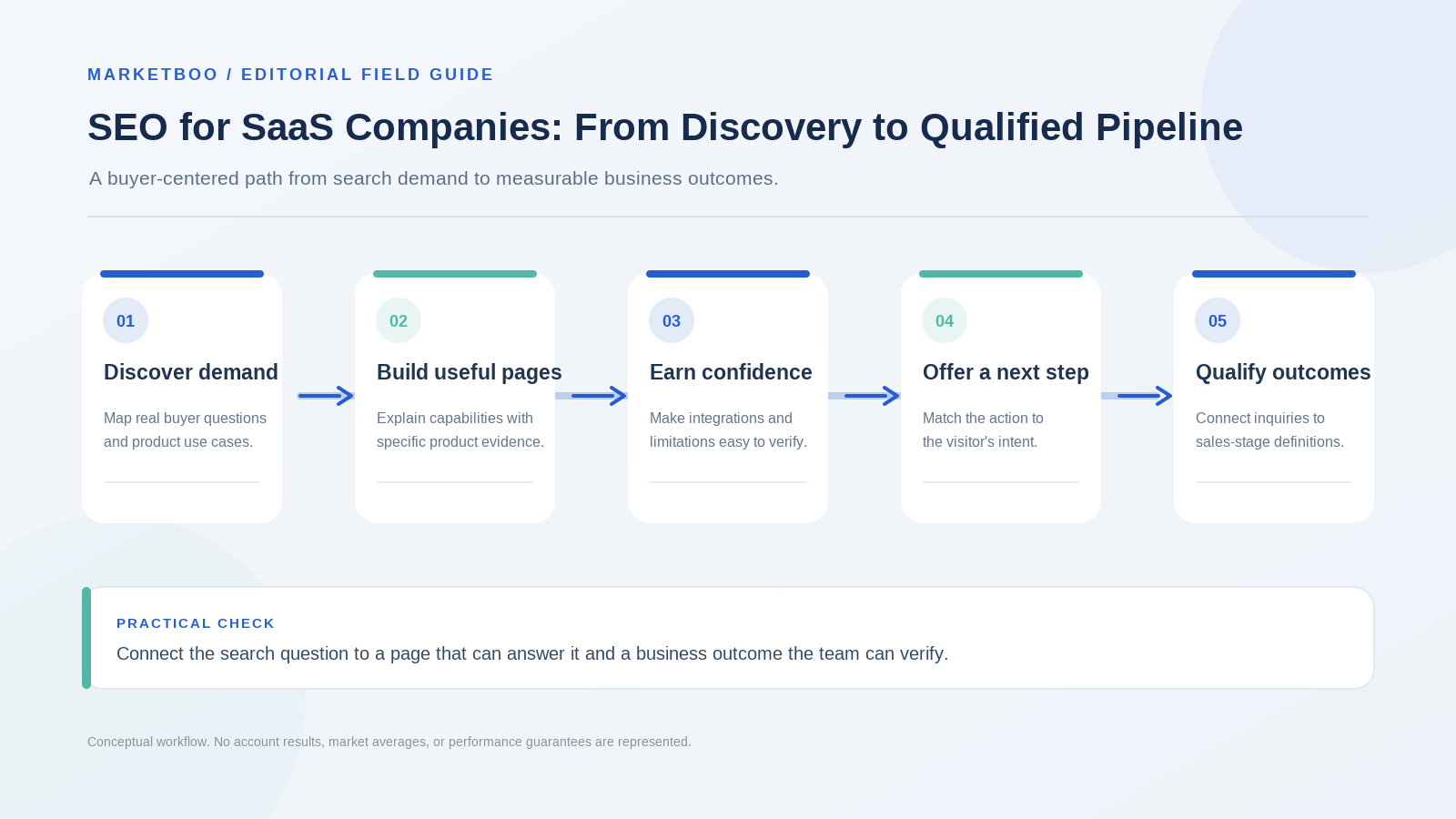
SEO for SaaS companies connects how potential buyers search with pages that explain the software, show where it fits, and make the next step clear. A practical program covers technical access, use-case and product pages, useful integrations, supporting education, and measurement beyond sessions. Start by assigning each meaningful buyer question to the page that can answer it. Then connect that page to product evidence, a relevant trial or demo, and a way to observe qualified progress. The approach helps a team find gaps; it cannot guarantee rankings, traffic, or pipeline.

The response is often to commission more articles or increase publishing frequency. Before doing that, follow a real buyer’s journey through the site. Can someone who searches for a workflow problem find an explanation that does not assume they already know your category? Can that person verify that your software supports the workflow, works with the tools they use, and has a reasonable path to adoption? Does the site make a trial or demo available at the point it becomes useful? If one link is missing, extra traffic may only add to the same gap.
SaaS search strategy is different from writing a general software glossary. Buyers search by symptoms, tasks, team structures, product categories, integrations, alternatives, security concerns, and purchase requirements. The same visitor may move from “how to reduce approval delays” to “workflow automation software,” then to “software that integrates with [system]” and finally to a vendor comparison. Search cannot be mapped to one universal funnel in which every person moves neatly from awareness to purchase. A content plan is better treated as a set of possible paths with pages that help answer a specific question at each point.
Google’s Search documentation describes making pages understandable and useful for people, and its SEO Starter Guide recommends clear organization and descriptive, human-readable content.[1][2] That is a practical standard for software companies: each page should make a claim a buyer can verify. Avoid producing a page just because a keyword exists. Search demand is an input; the decision to publish should also consider product fit, unique evidence, maintenance needs, and the next action a reader can take.
What SEO for SaaS companies includes
SEO for a software business includes technical accessibility, page architecture, useful product and editorial content, credible external references, and measurement. The work is not limited to a blog. Search engines and buyers may need to understand feature pages, use cases, integrations, comparison pages, customer stories, documentation, pricing explanations, and supporting resources. Each type has a different job. A feature page explains a capability; an integration page explains how two products work together; a customer story supplies scoped evidence; a troubleshooting article answers a practical question; and a pricing page explains commercial terms.
The login application is often a separate experience from public marketing content. A crawler should be able to discover pages intended for search, while account-specific, private, or thin utility pages usually do not belong in the public index. Product information that helps a prospect evaluate a solution should be clearly accessible on public URLs. Do not expose customer information or private workflows just to make an area crawlable. Access control and search visibility are different concerns, and security should never be weakened for ranking purposes.
A working SaaS site map can be organized around buyer questions instead of internal departments. A company may group pages under outcomes, product capabilities, industries or use cases, integrations, comparisons, proof, and help. These are not rigid SEO categories. They make it easier to see whether the site explains how a product is discovered, evaluated, adopted, and supported. The right grouping depends on the product’s actual structure and the vocabulary customers use.
Map query intent to the page that can answer it
Before assigning a keyword to a URL, write down the question behind the query and the evidence a good answer requires. Search intent is an informed hypothesis, not a fact about an individual searcher. A phrase such as “project workflow tool” might come from a buyer, student, consultant, or existing user. Use the language as a starting point, then compare it with Search Console queries, customer interviews, sales calls, product analytics, and support themes.
| Buyer question or query family | Page that can answer it | Evidence or detail to include | Appropriate next step |
|---|---|---|---|
| “Why does this workflow break?” | Problem guide or practical resource | Process explanation, causes, constraints, diagnostic steps | Read a related use case or assessment |
| “What does this software category do?” | Category or solution page | Clear definition, typical use, limits, alternatives | Compare product fit or view a demonstration |
| “Can the product handle this task?” | Feature or use-case page | Specific workflow, user roles, inputs, outputs, availability | Try the feature or request a tailored demo |
| “Will it work with our stack?” | Integration page | Supported connection, setup requirements, sync behavior, limitations | Review setup documentation or start a trial |
| “How does it compare with option X?” | Comparison or alternatives page | Fair feature and use-case comparison, dated scope, sources | Evaluate the fit against requirements |
| “Is it suitable for our team?” | Industry, team, or customer story page | Team context, deployment scope, challenges, measured outcome where verified | Discuss requirements with sales |
| “What does it cost or require?” | Pricing, implementation, or security page | Commercial terms, onboarding, data handling, required plan details | Contact sales or review terms |
This map reduces keyword cannibalization. If several pages target the same primary question with nearly identical answers, the team may be splitting one job across competing URLs. Consolidation is not always right: different roles, use cases, or product modules may justify distinct pages. The test is whether each page has a distinct audience need and materially different supporting information. If not, strengthen one destination instead of multiplying thin pages.
Internal links should help the reader move logically. A problem guide can link to a related use case, that use-case page can link to implementation details, and the integration page can link to documentation. The anchor should describe the destination in natural language. Avoid inserting an exact-match phrase into every paragraph. Search engines may use links to understand relationships, but the reader’s ability to navigate remains the reason to add them.
Build the path from discovery to qualified pipeline
Organic search can support the path to revenue, but it rarely owns the whole journey. A visitor may see a brand in an AI answer, return later through a direct visit, share a page with a colleague, and eventually convert after a sales conversation. Last-click reports can miss these touches. Track what the systems can observe and describe the boundary honestly. Google Search Console reports search performance using metrics such as clicks, impressions, click-through rate, and average position, with dimensions such as query and page.[3] Those metrics describe search visibility and site visits; they do not identify every influence on a purchase or prove that SEO caused revenue by itself.
The measurement model should connect a page to the next event without pretending one event represents the whole business outcome. For an enterprise software company, that may include a qualified content visit, a demo request, a sales-accepted lead, an opportunity, and a closed-won customer. For a self-serve product, it may include trial start, activation, paid conversion, and retained use. Avoid calling every download or form completion a lead. Write down what makes a person qualified, which data source owns the status, and when the team reviews it.
A simple planning model helps teams decide what to improve. It is a diagnostic framework rather than an industry benchmark:
| Stage | Useful question | Example evidence | Owner to involve |
|---|---|---|---|
| Discovery | Are relevant pages appearing for relevant questions? | Query and landing-page trends in Search Console | SEO or content lead |
| Engagement | Does the page answer the question and invite an appropriate next action? | Scroll, navigation, CTA engagement, interviews | Product marketing and UX |
| Evaluation | Can a buyer verify capability and fit? | Product details, integration coverage, security materials | Product, engineering, sales |
| Conversion | Can the visitor take the right next step? | Trial, demo, contact form, and error data | Growth and web team |
| Qualification | Does the inquiry match the target customer and need? | CRM acceptance and disqualification reasons | Sales and RevOps |
| Commercial result | Does organic acquisition contribute to useful business outcomes? | Cohort pipeline, customers, retention, and costs | Finance and marketing |
These stages expose the likely constraint. If impressions grow but clicks do not, examine whether titles and snippets accurately communicate the page’s value and whether the query is a good fit. If clicks grow but engagement is weak, check the landing experience and page-answer match. If readers engage but do not begin a trial or request a demo, check whether the action is clear, appropriate, and supported by credible product information. If conversions happen but sales rejects them, revisit audience definition, search theme, qualification, or the form. The answer is not always “publish more.”
Make product pages useful to someone evaluating the software
A strong product page explains what the capability does in terms a buyer recognizes. Lead with the workflow or decision it supports. Translate internal feature names into outcomes without claiming that software removes every operational constraint. Show which teams use the feature, how it interacts with the rest of the product, and what a visitor needs before trying it. Feature pages become weak when they contain only slogans, screenshots without explanation, and a list of benefits that could apply to any product.
The product team can help make these pages more accurate. Ask engineering what conditions must be met for a feature to work, which integrations are native, what requires configuration, and which limits matter. Ask customer success which implementation questions recur and what causes adoption to stall. Ask sales which proof prospects request before a meeting. Then use only claims the organization can verify. Product availability, security posture, supported regions, certifications, and customer outcomes can change; give each important claim an owner and review date.
Screenshots and interface examples should clarify a workflow, not substitute for a description. Provide context for what the reader is seeing, use alt text that explains the image’s purpose, and ensure essential information is also available as text. If a page relies on JavaScript to render content, check that key information is available to search engines and users after rendering. Google documents the stages of JavaScript search processing and recommends testing rendered output when a page uses client-side rendering.[4] The test should include links and primary text, not merely whether the page visually loads in a browser.
A good page also describes its boundary. If an integration syncs certain fields but not others, say so. If a capability requires a plan tier, configuration, or administrator permission, explain that condition. If the product is not a fit for a particular workflow, state the limitation. Honest boundaries help a prospect self-select and reduce confusion after conversion. They also make the copy more specific and useful than an unqualified promise.
Treat integration pages as technical documentation for buyers
Integration pages often have strong commercial relevance because users want to know whether tools will work together. They are also easy to scale badly. Creating dozens of near-identical pages from a template can lead to thin content, inaccurate claims, and poor maintenance. A page deserves to exist when the connection is supported and there is useful information to provide: the data transferred, sync direction, setup steps, permissions, limitations, troubleshooting, or common use case.
A credible integration page should be reviewed by someone familiar with the connection. Confirm whether it is native, partner-built, API-based, or available through a third-party connector. State the prerequisites and disclose where the integration does not meet a user’s expected behavior. Link to setup instructions and relevant vendor documentation. If pricing, plan availability, permissions, or API behavior changes, update the page. A stale integration claim can harm trust and create support work.
Before building a new integration landing page, ask whether an existing directory or documentation page would serve better. Avoid a separate URL for every tiny wording variation. Use clear URL patterns and sensible internal navigation, then track whether the page attracts relevant queries and helps users. If no one can confirm the connection’s behavior, do not publish a definitive promise.
Decide when a topic deserves a page
A calendar is not evidence that a topic should become an article. Choose topics by looking for an intersection of audience need, product relevance, and the company’s ability to provide a distinctive answer. A keyword may have uncertain demand yet still be useful if it corresponds to a frequent sales objection or implementation question. Another phrase might show apparent volume but attract readers who cannot use the product. Where search volume and difficulty are unverified, do not represent them as known facts.
A lightweight editorial scorecard can make the decision easier. Rate each candidate qualitatively, then discuss the evidence rather than pretending the score is a scientific measure. Ask whether the query reflects a problem the product solves, whether a credible subject-matter expert can review the answer, what page type is appropriate, how much maintenance it needs, and which existing page may already answer it. The scorecard helps prioritize the next conversation; it does not replace research.
A SaaS team should be careful with programmatic pages. Templates can be valuable where product data is structured and the output genuinely answers different questions. They become risky when the only variation is a city, industry label, or integration name without unique information. Before scaling a template, review representative pages for factual accuracy, distinct utility, indexability, canonical behavior, and internal navigation. Monitor whether generated URLs produce meaningful search demand and whether a human team can maintain them.
Google’s guidance on helpful, reliable, people-first content emphasizes whether material provides original value and a satisfying experience for the intended audience.[5] For a software publisher, that means the article should be able to answer the reader’s question without forcing them to accept a marketing claim. Include technical detail when it changes a decision, show a real workflow where the company can substantiate it, and distinguish an observation from a recommendation. Do not fabricate customer stories or imply personal product use that the author did not have.
Turn product knowledge into useful examples
A page becomes more persuasive when it demonstrates what the product helps a person do. A workflow example can begin with a recurring task, show the information or people involved, explain which product capability supports each step, and identify the points where human review remains necessary. This is more credible than saying the software “transforms productivity.” If the example is hypothetical, label it. If it comes from a customer, obtain permission, verify the details, and give the scope needed to interpret any result.
Use examples that show the complexity of actual work. A project-management SaaS article might explain how a team receives requests, assigns owners, sets approval rules, and checks that work is complete. A sales platform might show how a rep captures a customer interaction and how a manager reviews next steps. The product description should be precise enough that an evaluator can tell whether it fits their process. If a step requires another service or a manual action, say so.
Screenshots can support an example if they are current, legible, and accessible. Crop out private data, label the context, and avoid implying that a mock interface reflects a feature already available to customers. A short video or interactive demo may answer a question more efficiently than a long page, but the page should still provide text explaining the task and key limitations. Readers should not have to play media to discover the basic facts.
How to build a 90-day SEO program for SaaS companies
The following sequence is an editorial planning framework. It is not a promise that a team will achieve a particular ranking or pipeline number within ninety days. Its purpose is to make research, publishing, implementation, and review follow one another so the team can learn from actual outcomes.
| Period | Work to complete | Required evidence | Decision at the checkpoint |
|---|---|---|---|
| Days 1–15 | Confirm product lines, markets, audience, funnel events, analytics access, crawlability, indexation, and top sales questions | Existing URL inventory, Search Console baseline, CRM event definitions, product and sales input | Which business line and buyer path can be measured reliably? |
| Days 16–30 | Map query families to existing pages; identify overlaps, missing product proof, and technical blockers | Query/page review, crawl sample, page owners, conversion-path notes | Which one to three gaps deserve priority? |
| Days 31–50 | Improve key product, use-case, integration, or help pages; resolve high-impact internal-link and rendering issues | Technical QA, product review, approved claims, form and event testing | Are the pages accurate and usable for the intended visitor? |
| Days 51–70 | Publish a small set of genuinely distinct supporting resources; connect them to product destinations | Editorial review, citations, internal link map, accessibility and QA checks | Does each resource answer a real question and support a next step? |
| Days 71–90 | Review search visibility, page engagement, qualified conversions, CRM feedback, and open defects | Search Console data, analytics and CRM cohorts, annotation of changes | Keep, revise, consolidate, or pause each initiative based on evidence |
- Write the business brief. Name the target product, buyer, market, sales motion, product boundary, and conversion definition. Ask sales and customer success for recurring questions and disqualification reasons. Keep phrases from real conversations in their original context rather than converting every phrase into a keyword target.
- Inventory the current site. Export public URLs and group them by function: product, use case, integration, pricing, comparison, proof, documentation, and editorial. Flag pages with duplicate purpose, obsolete claims, missing ownership, access restrictions, or uncertain canonical signals.
- Inspect search evidence. Review Search Console queries and landing pages over an appropriate period. Separate branded and nonbranded behavior where helpful. Note that low-volume or privacy-filtered queries may not appear in a report, and average position does not explain every result layout or user experience.
- Choose a small page set. Prioritize pages that address a meaningful product question or remove an evaluation obstacle. For each page, define the reader’s question, unique answer, evidence source, product reviewer, internal links, primary action, and maintenance owner.
- Repair technical barriers. Check that target pages return the intended status, are crawlable, render important text and links, use the correct canonical, appear in the appropriate sitemap if eligible, and are internally linked. Test a representative URL in Search Console and a browser that does not have privileged access.
- Publish and connect pages. Use the language buyers recognize. Include technical details and limitations where relevant. Link between related resources only when it helps the reader progress. Update navigation or contextual links so important pages are not isolated.
- Validate the conversion path. Submit forms and test trial signup flows. Check analytics events, CRM record creation, deduplication, confirmation pages, and follow-up. A conversion event should fire only when the defined action actually completes.
- Review outcomes and make a decision. Compare the new evidence with the baseline, note the date and other site changes, read sales feedback, and decide whether to improve, consolidate, expand, or stop. Organic visibility can take time and may be affected by many external factors; no single ninety-day result guarantees later performance.
The sequence should flex to the organization. A newly launched site with serious indexation problems may need more technical work before content publishing. A mature site with reliable infrastructure may focus on product proof and internal architecture. A small team can complete fewer pages well rather than publish a large backlog of unreviewed material.
Technical basics that protect the content investment
A search strategy cannot compensate for pages that are blocked, inaccessible, duplicated, or missing from internal navigation. Start with crawlability and indexation: check robots rules, noindex directives, HTTP status, redirects, canonical tags, and sitemap inclusion. A canonical is a signal about preferred URLs, not a substitute for fixing every duplicate or linking problem. Google documents how canonical URLs are selected and recommends consistent signals across a site.[6]
XML sitemaps help search engines discover URLs, but inclusion does not guarantee indexing. Include only pages you want considered for search, keep the file current, and avoid treating the sitemap as a replacement for links between related pages. Google provides sitemap guidance and explains submission through Search Console.[7] For a growing SaaS site, ensure the sitemap does not accidentally prioritize private product routes, tracking parameters, or obsolete variants.
If a website uses a JavaScript framework, test rendered HTML and navigation rather than assuming a browser view tells the whole story. Google can render JavaScript, but rendering behavior and technical defects still matter. Server-side rendering or pre-rendering may improve resilience and usability, but the right implementation depends on the architecture. Confirm that primary content is available, links are crawlable, metadata is accurate, and state changes do not create duplicate or misleading URLs.
Structured data can describe eligible content in machine-readable form, but it does not guarantee a rich result or a ranking boost. Follow Google’s general structured-data guidelines and mark up only content visible on the page.[8] For a SaaS brand, do not mark up a feature page as a review or product offer unless the content genuinely meets the relevant requirements. Structured data should improve clarity, not embellish the page with claims it cannot substantiate.
Core Web Vitals and page performance affect whether a site feels responsive and stable. They are one part of page experience and should be considered alongside content, product fit, and usability. Use field data where available and lab diagnostics to investigate likely causes. A score is not a conversion guarantee. Prioritize real user problems such as delayed interactions, layout shifts around forms, large page assets, and inaccessible controls.
Common mistakes that make SaaS SEO noisy
Publishing only blog posts
A site can publish consistently while leaving its strongest commercial pages vague or incomplete. Review the pages that explain capabilities, use cases, integrations, security, pricing, and migration. Support articles can attract useful discovery, but they should not be expected to compensate for a product page that cannot explain fit.
Turning every feature into a standalone URL
A separate page is justified when a distinct query, workflow, or buyer question needs a distinct answer. Repeating the same benefit statement across multiple feature URLs can dilute clarity and create a maintenance burden. Consider strengthening a central page and linking to specific documentation instead.
Writing for the crawler instead of the buyer
Repeating keyword variants does not make a page persuasive or more useful. Use the phrase naturally where it identifies the subject, then cover the concepts needed to answer the question. A page should read like something a subject-matter expert would approve for a real prospect.
Reporting sessions as pipeline
Organic sessions are useful for understanding reach and behavior, but they are not qualified opportunities. Track meaningful stages and explain the time lag, attribution model, and CRM definitions. Report influence cautiously when it cannot be measured directly.
Scaling content before establishing a reviewer
Software changes quickly. Product claims, integration behavior, compliance language, and UI screenshots can become stale. Assign an owner before publishing and schedule review based on how quickly the underlying facts change. If there is no one to maintain a page, consider whether it should exist.
FAQ
What is SEO for SaaS companies?
It is the work of helping relevant software buyers discover and evaluate a product through search. It includes technical accessibility, product and use-case pages, documentation and editorial resources, internal architecture, and measurement. Its scope depends on the product and sales motion; a self-serve tool and a complex enterprise platform will not need identical page systems.
Is SaaS SEO different from regular SEO?
The fundamentals of accessibility, useful content, and clear site architecture apply broadly. SaaS companies often need to explain workflows, integrations, implementation, security, product limitations, pricing, and alternatives across a long evaluation. Product pages and customer proof usually matter alongside educational content, and measurement may connect search visits with trials, demos, and CRM stages.
Which pages should a SaaS website create first?
Start with the pages required to explain the product to the intended buyer: a clear solution or product page, high-value use cases, supported integrations, and any essential implementation, security, or pricing information. Use sales questions and search evidence to select supporting resources. Avoid publishing every possible feature or industry page before confirming that it answers a distinct need.
How does a SaaS company measure SEO performance?
Use several layers of evidence: Search Console visibility and clicks, landing-page engagement, relevant trial or demo actions, qualification, CRM progression, and business outcomes over an appropriate period. Define each stage and data source. Organic search reports cannot capture every influence or establish causality on their own, so explain attribution limits.
Should SaaS companies index their app or login pages?
Public product information that helps buyers evaluate the software can be indexable. Private account areas, user-specific pages, and thin utility screens typically are not useful public search results and should retain appropriate access controls. Review app architecture with engineering and security teams; never expose private data or weaken authentication to make a page crawlable.
Do integration pages help a SaaS SEO strategy?
They can help when the integration is real, supported, and described with useful information such as setup, data flow, prerequisites, limitations, and use cases. Near-duplicate integration pages with only a changed vendor name can be thin and hard to maintain. Confirm every technical claim with someone who understands the connection.
How often should SaaS SEO content be updated?
Update it when a fact changes, when the product or supported market changes, when users encounter a documented gap, or when performance evidence suggests the page no longer answers the query. A review cadence should match the volatility of the information. Pricing, integrations, screenshots, security claims, and product availability may need closer oversight than stable conceptual guidance.
Build organic discovery around real product decisions
SaaS SEO earns its place when a buyer can move from a search question to useful information, verify product fit, and choose a sensible next step. A strong program balances problem education with product and integration detail, keeps technical paths accessible, and treats measurement as a chain of evidence rather than a single traffic number. The practical work is specific: define page roles, review claims with product experts, connect pages through helpful links, and learn from the questions sales continues to hear.
For help connecting search strategy with technical implementation and product-page planning, review Marketboo’s SEO and GEO services. If your current site structure or conversion path needs a broader review, contact Marketboo with the product, audience, and page challenge you are working through.
This is the practical role of SEO for SaaS companies: guide a clear next action and make the result measurable.